
100% Offline AI Dictation & In-Place Voice Editing on Windows: Whisper, Parakeet & UI Automation Under the Hood
How SlyPilot Pro combines local CUDA/Vulkan Whisper & Parakeet neural engines with Windows UI Automation (SlyUia.exe) for in-place voice editing, document vocabulary harvesting, and offline audio/video file transcription.
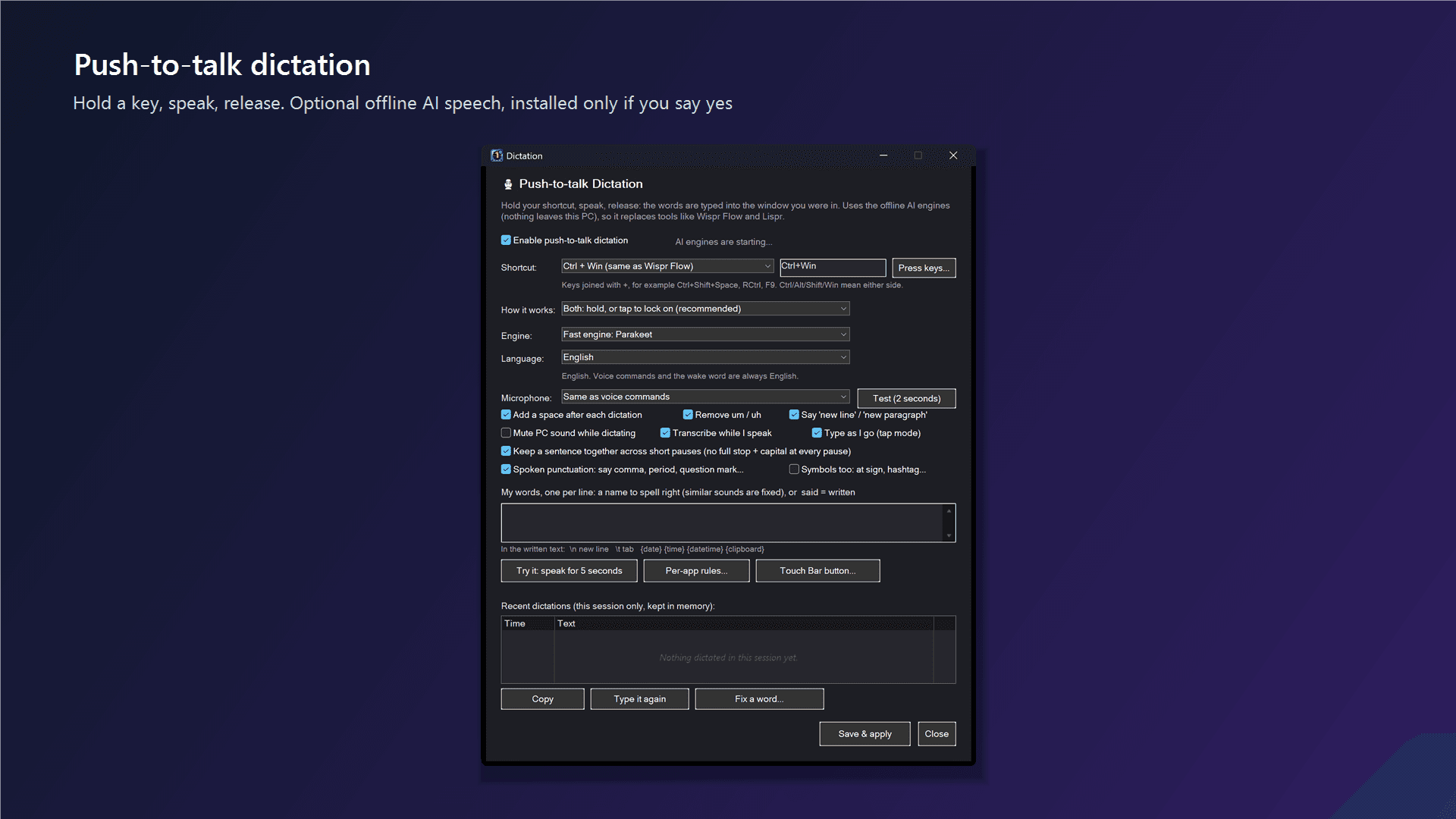
The Cloud Dictation Dilemma vs. Local GPU Speech
Modern AI speech-to-text has transformed how fast we can write emails, documentation, prompts, and code comments. Yet nearly every commercial AI dictation tool on Windows - such as Wispr Flow ($144/year) or cloud-based transcription services - requires streaming every syllable you speak to remote third-party servers. For developers working under NDA, healthcare and legal professionals, or anyone who values privacy and predictable one-time ownership, sending raw microphone audio to the cloud is a non-starter.
SlyPilot Pro solves this by running OpenAI Whisper (including Whisper Large v3 Turbo) and NVIDIA Parakeet 0.6B 100% locally on your own hardware via CUDA 12, Vulkan (AMD Radeon & Intel Arc), or AVX2 multi-threaded CPU. Once your chosen model is downloaded and verified by SHA-256 checksum, zero audio packets or transcripts ever leave your machine.
In-Place Voice Editing via Windows UI Automation (SlyUia.exe)
Fast dictation is only half the battle; real writing involves revising what is already on the page. Traditional dictation tools only let you undo the very last phrase you spoke ('scratch that'). In SlyPilot, we introduced full In-Place Voice Editing powered by our native UI Automation bridge, SlyUia.exe.
While holding Right Alt (or speaking directly during a dictation session), you can target any word, phrase, or sentence anywhere in your active document across Notepad, WordPad, Microsoft Word, Edge, Chrome, and code editors. Say 'select quarterly report', 'replace colour with color', 'delete from hello to world', 'delete previous sentence', 'uppercase first three words', 'quote quarterly report', or 'insert urgent before deadline'. When a phrase appears multiple times on screen, SlyPilot highlights every match in yellow and selects the instance closest to your caret - just say 'next one' or 'previous one' to step between them.
Teaching SlyPilot Your Jargon: 'Add Words From My Documents' & Spoken Forms
Out-of-the-box speech models often stumble on internal project codenames, CamelCase class names, or specialized acronyms. Instead of typing custom words one by one, SlyPilot lets you click 'Add words from my documents...' in Dictation Settings and point it at your own .docx, .pdf, .md, .txt, .eml, or .html files. SlyPilot scans those files 100% locally on your PC, extracts recurring proper nouns, acronyms, and CamelCase identifiers, and lets you add them to your vocabulary in seconds - complete with phonetic spoken forms like 'cube control = kubectl' or 'post gres = PostgreSQL'.
Batch-Transcribing Audio & Video Recordings into Markdown & SRT Subtitles
Need to transcribe a recorded interview, lecture, or video file? Click 'Transcribe a file...' in the SlyPilot tray menu (or run SlyPilot.exe transcribe <file>) and drop in any .mp3, .m4a, .wav, .flac, .mp4, .mkv, or .webm file. SlyPilot decodes the audio via Windows Media Foundation, splits on natural speech pauses, and generates .transcript.txt, .md, .srt, .vtt, or .json files right next to your recording - plus an optional .summary.md with key decisions and action items. And if you press Right Ctrl to dictate live while a long recording is transcribing, batch file transcription automatically pauses so your live typing never waits a millisecond.
Ready to dictate, edit by voice, and transcribe files 100% offline? Explore SlyPilot Pro ($39 one-time) or read the complete Dictation & Voice Editing Guide.
Comments
Leave a Comment
No comments yet. Be the first to share your thoughts!