
Sound Themer: New Sounds for Windows, and Always a Way Back
Windows has made the same few sounds for years, and its Sound panel has hardly changed since Windows 95: a list of cryptic event names, a Browse button
Windows has made the same few sounds for years, and its Sound panel has hardly changed since Windows 95: a list of cryptic event names, a Browse button, and no way to try a whole set of sounds without losing the ones you had. The Sound Themer is the Sound page Windows should have: every event in plain words, whole sound packs in one click, a pack that covers every event even when it brings only a few sounds, and one click back to the sounds you had.
It is part of the free SlyPilot.
What is free and what is Pro. All of it is free. Nothing on this page needs SlyPilot Pro.
   a sound pack: .slysound, a Sound Manager .ths, a Windows theme pack,
   a Linux sound theme, or a zip / folder of sounds
                    │  checked before anything is unpacked: only sounds, pictures and text, size limits, nothing is run
                    │  converted (MP3, OGG, FLAC ...), named after the Windows events, checked for loudness
                    ▼
        the card: its picture, who made it, its licence, every sound with Play
                    │  Add  /  Add and apply
                    ▼
   Windows plays it everywhere (it shows by name in Windows' own Sound panel too)
   events the pack leaves out borrow its closest sound  ──  Undo · Restore the Windows sounds
✨ Every Sound in Plain Words
Tray > Utilities > Sound Themer (Windows Sounds)..., or say "sound themes".
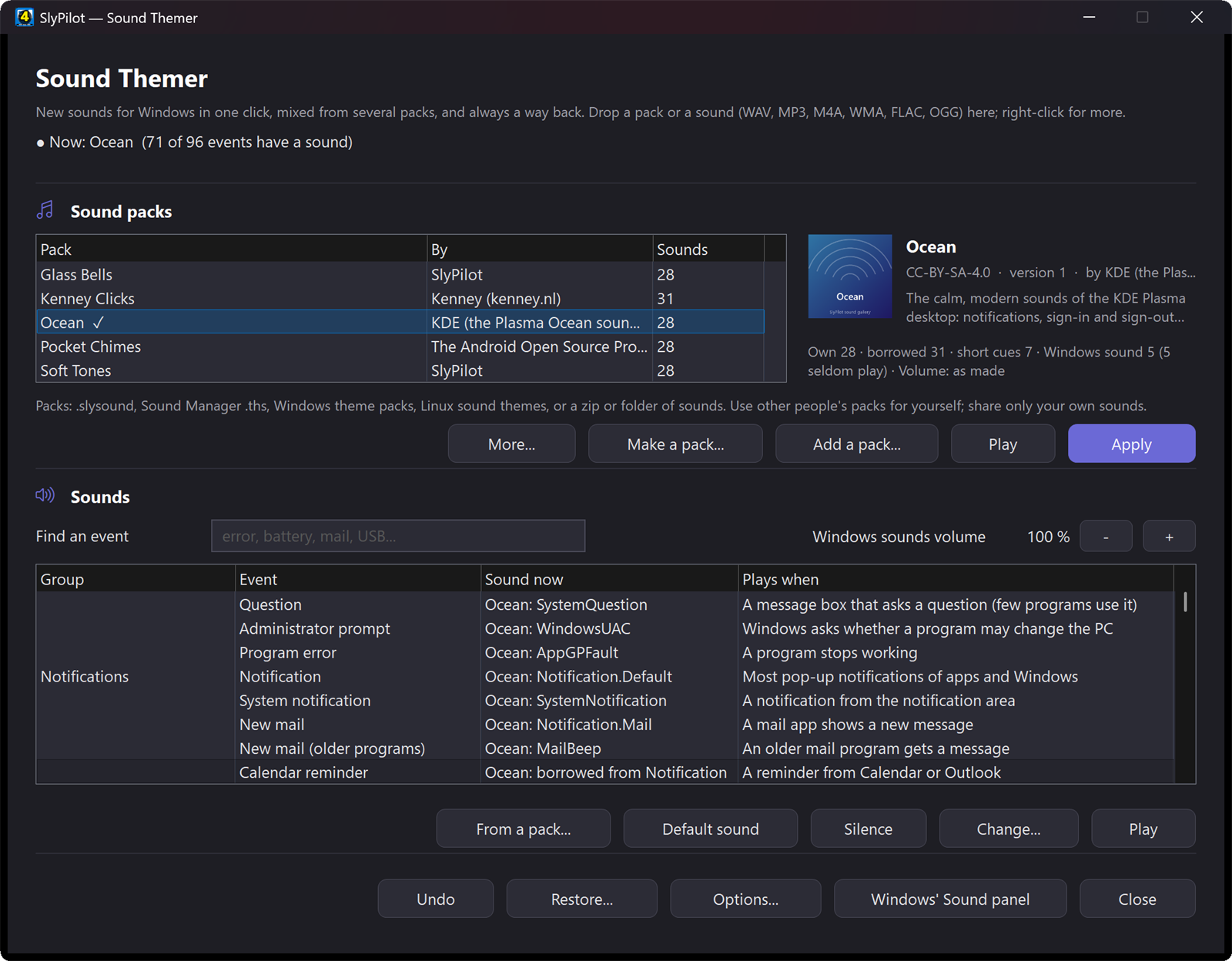
Every event Windows can sound for is listed with what it is and when it plays, in words: "A message box with information" rather than SystemAsterisk. The ones Windows 11 no longer plays are marked, so you do not spend an afternoon on a sound you will never hear. The Listen check (Options) finds out on your own PC: it gives each doubtful event a short test tone for a moment, makes it happen, asks whether you heard it, and puts your own sound back after each step.
- Play, Change... (WAV, MP3, M4A, WMA, FLAC or OGG: SlyPilot converts it, trims the silence and makes it about as loud as the rest), Silence and Default sound (Windows' own).
- Where a sound comes from: the list says when an event plays a pack's sound it borrowed ("Ocean: borrowed from Notification") or a short cut of one ("a short cut of Command done", "a short cue of Device connected").
- Mix and match: From a pack... (or right-click an event) to listen to the same event in every pack you have and take the one you like.
- Find narrows the list as you type. Keys: Space plays, Delete silences, Ctrl+Z undoes.
- Repair: when a sound's file has gone, Restore... gives that event the Windows sound back.
🎁 Sound Packs in One Click
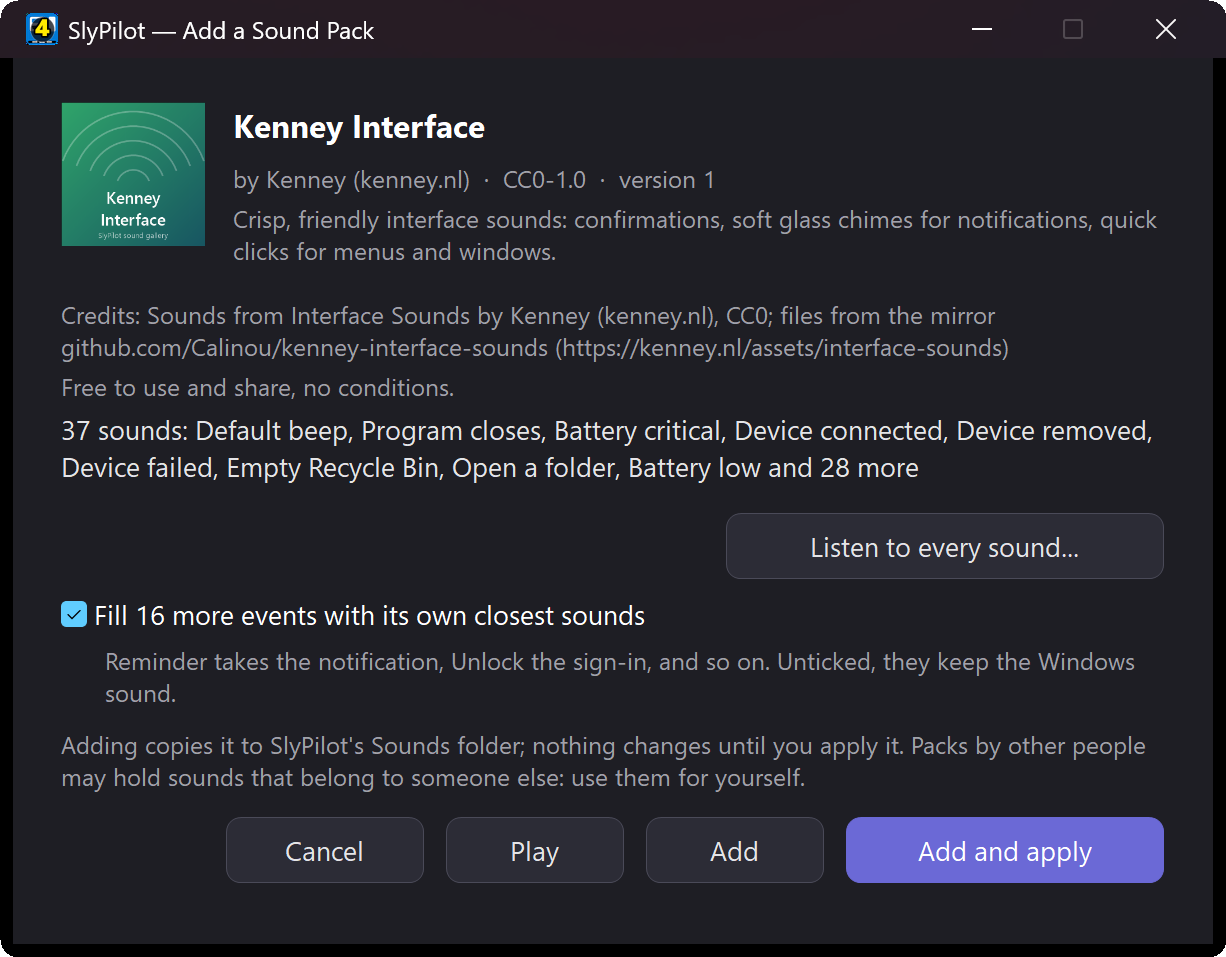
A pack is one file. Double-click it, drop it on the window, or use Add a pack.... A card shows it first: its picture, who made it, its licence and Listen to every sound... with a Play button for each. Nothing changes until you press Add or Add and apply. A pack you already have is offered as Replace.
- Soft Tones, a pack SlyPilot makes on your PC (free to use and share), is there the first time you open the Sound Themer.
- Get more packs... lists the free packs of the SlyPilot sound gallery and the Sound Manager collection on GitHub (about 160 packs collected by its community, for your own use). A pack is downloaded only when you click it, checked, and shown on the card first. The list says which packs you have and when the gallery has a newer version of one.
- Switch packs anywhere: the tray's Sound Pack menu, "next sound pack", "previous sound pack", "which sound pack is on", "use sound pack Ocean", the command palette, or
SlyPilot.exe sound-themer apply <pack>.
🧩 No Gaps: a Pack Covers Every Event
Most packs bring 15 to 40 sounds; Windows has more events than that. Left alone, the missing ones would play the old Windows sounds in the middle of your new theme. So SlyPilot fills them from the pack itself: a box on the card does it as you add a pack (ticked unless the pack asks otherwise; the gallery packs ask for it), and Edit details... > Events it has no sound for: borrow a close sound of the pack does it for a pack you already have.
- Borrowed sounds: an event the pack leaves out plays the pack's closest sound of its own: a missing Reminder takes the pack's notification, a missing Unlock its sign-in, a missing Device failed its error. Only the pack's own sounds are used, and an event Windows keeps silent stays silent.
- Short cues: SlyPilot's own start and stop sounds (dictation, the command key, listening, recording) are cut from the pack: a short piece of its rising sound for "start", of its falling sound for "stop". Dictation then sounds like the rest of the theme.
- Quick feedback stays quick: the sounds you hear many times a minute (command done, not understood, cannot do that, dictation cancelled) are cut to a quarter of a second when the pack would otherwise lend them a long chime.
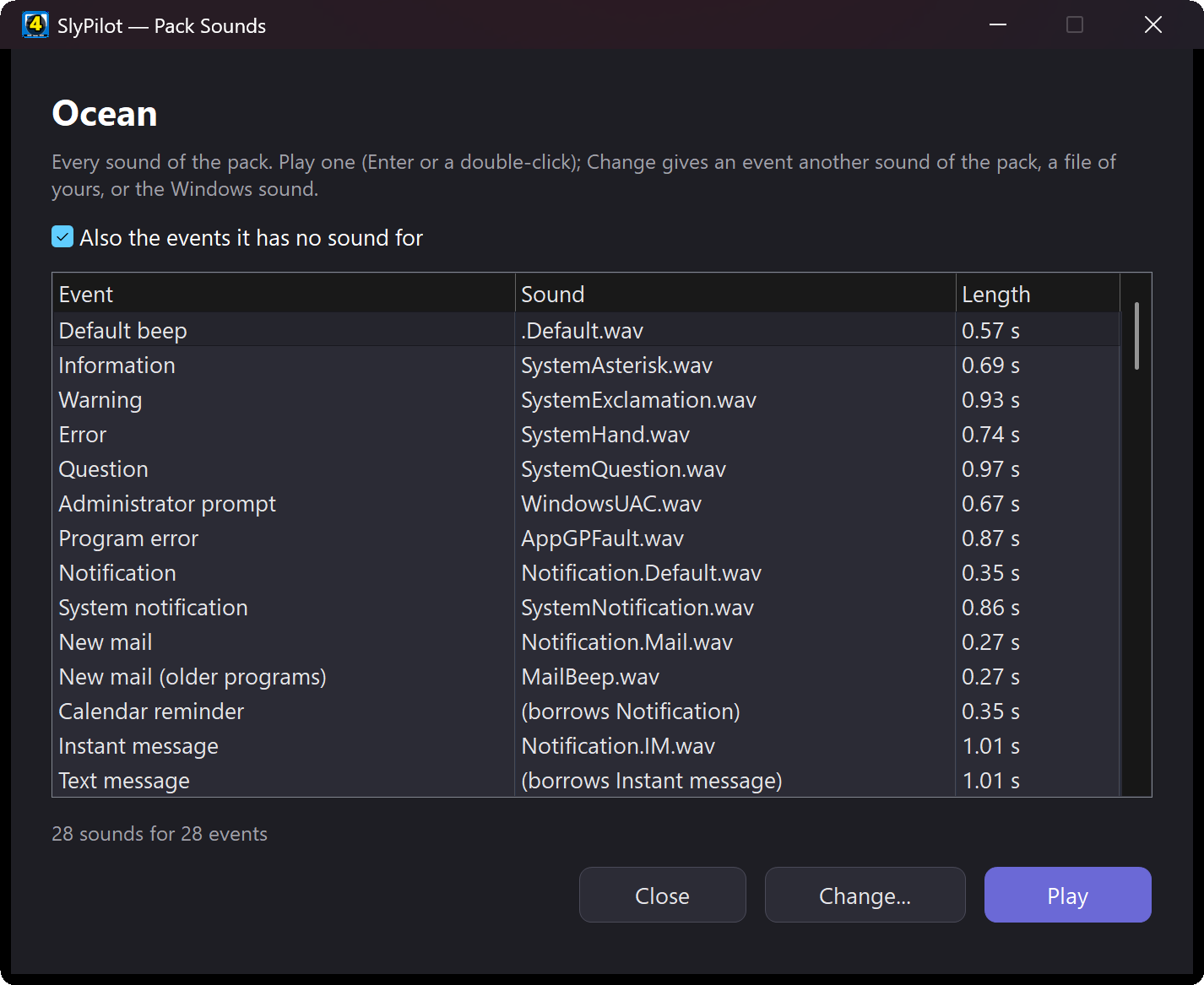
- In numbers: the pack's panel says what it covers, for example "Own 28 · borrowed 24 · short cues 7 · Windows sound 12 (5 seldom play)".
- Hear it: the pack menu's Its sounds (listen, change one)... plays the borrowed sounds and cues too (tick Also the events it has no sound for), and Hear the dictation cues (start, then stop) plays the two you will hear most.
The other choices for those events are keep the Windows sound, go silent and keep what they have.
🔊 As Loud as Windows, Never a Surprise
- A loudness check as a pack is added: the card names a sound you might not hear (an error far quieter than the rest) or one that is unusually long for a sound you hear often.
- Even out the volume: a pack much louder or quieter than Windows' own sounds is offered a fix as it is added; Even out the volume in the pack menu does it any time (quiet clicks stay quiet). Put back the original volume undoes it.
- Quieter or louder: a pack can be turned down or up in 4 dB steps, always from its original files.
- Windows sounds volume beside the Find box turns every Windows event sound down without touching music or calls. The Volume mixer has a Windows sounds row too.
↩️ Always a Way Back
- Undo says what it undoes ("Undo: Ocean applied").
- Restore...: the Windows sounds, your own sounds from before SlyPilot (saved once, before its first change), or no sounds at all.
- Uninstalling SlyPilot puts your old sounds back.
- After a Windows theme change: when a Windows theme replaces your pack's sounds, SlyPilot asks whether to put the pack back (or does it by itself if you tick that).
- By voice: "restore windows sounds", "turn off windows sounds", "turn on windows sounds".
🎲 Variety, If You Like It
- Quiet hours: from 22:00 to 07:00 (or any times you choose) no Windows sounds, quieter ones, or a calmer pack, and your sounds back at the end.
- Surprise me: another pack every day ("surprise me with a sound pack").
- Variants: a pack may carry several versions of a sound; Windows' sounds take another one each day, SlyPilot's own another at every play.
- A pack per mode: a Focus or Meeting mode can switch the sounds off or set a pack, and your sounds come back when it ends.
- Desktop tones: each virtual desktop has its own note, rising with its number, so you hear which desktop you are on ("desktop tones on").
- Sign-in, sign-out and shut-down: Windows 11 no longer plays them; while a pack is on, SlyPilot plays the pack's own (a box switches this off).
🔔 SlyPilot's Own Sounds Too
The dictation key, the command key, listening, "command done", "not understood", timers, recordings and screenshots are Windows events of their own (also in Windows' Sound panel under SlyPilot), 24 in all. A few are silent until you give them a sound: a screenshot, switching desktops, snapping a window, a Touch Bar tap, a copy, the Magnifier, modes. Give each a sound of yours, a pack's, or silence; packs can carry them too.
📦 Packs From Everywhere
| You have | What SlyPilot does |
|---|---|
a .slysound pack | adds it as it is |
a Sound Manager .ths pack | reads its names and picture |
a Windows theme pack (.themepack, .deskthemepack, such as the Windows 7 gallery themes) or a .theme file beside its sounds | takes its sounds (the wallpapers are left out) |
a Linux sound theme (KDE Ocean, freedesktop: .tar.gz, .tar.xz, .zip or a folder with index.theme) | converts its OGG sounds, maps them by the freedesktop names, keeps its licence and authors |
| a zip or folder of sounds with old Windows names (Windows XP Error, chimes, tada ...) or plain words (error, mail, logon) | guesses the event of each file; you can change any of them |
Every pack is checked before it is unpacked: only sound, picture and text files, no paths out of its folder, size limits read first and enforced while copying, every sound decoded and checked. Nothing in a pack is ever run. Stardock's encrypted .soundpack files are not opened (open them in SoundPackager).
📜 Credits and Licences
Every pack keeps who made it, its licence and the licence text that came with it. Credits and licence... in the pack menu shows them, with a sentence on what the licence asks of you. Share this pack makes one file for a friend when the licence allows it (credits, web page and licence text go with it; a share-alike pack says it must keep its licence). Packs from the Sound Manager collection are marked "for your own use", so Share stays off for them.
🎁 Matching Sets: Pointers and Sounds Together
Tray > Utilities > Matching Sets (Pointers and Sounds)... puts on a pointer pack and a sound pack that belong together, in one click: Arcade (coin pointers and chiptune sounds), Haunted night, Winter, Deep space, Ocean, Garden, Dia de Muertos, Calm focus, Neon night, Coffee shop and Paper and music box. The first time you use a set, SlyPilot draws both packs on your PC in a few seconds (nothing is downloaded); after that it is instant. Save what is on now keeps your own pair, Surprise me picks one, and Undo puts back the pointers and the sounds you had. Say “use the winter set”, “surprise me with a set” or “which set is on”.
🎨 Make Your Own Pack
- Start a new pack folder (Make a pack...) writes a guide to every sound (its file name, when it plays, how long it should be) and a ready prompt per sound for an AI sound-effect tool, in the style you describe ("warm wooden marimba, soft and short").
- From a style (Make a pack...) makes a whole pack on your PC, with nothing to download or record: pick a voice (soft tone, bell, marimba, plucked string, 8-bit chip, electric piano, glass bell, music box, water drop, organ, theremin, wood block), a mood (bright, dreamy, moody, spooky, magic, arcade), a key, a speed and a pitch, and SlyPilot plays every one of its 28 events in that voice: rising when something arrives, falling when it goes, low when something is wrong. Hear it plays three of its sounds first, Surprise me chooses for you, and a card lets you listen to every sound before the pack is added; the pack is free to use and share (CC0).
- From my sounds now (Make a pack...) turns the mix you have built in the list into one
.slysound(Windows' own sound files are left out). - Change one sound of a pack from its sound list: another sound of the pack, a file of yours, or the Windows sound.
- Shorten or fade one sound (Change... > Shorten or fade this sound...): cut the start, keep only the first part, fade in and out. Hear it plays the result first; the pack keeps the original, so you can always go back.
- Edit details: name, author, licence, credits, web page and picture.
The Sound Themer guide has the pack format, and the sound gallery says how to send a pack in.
🗣️ Voice, Palette, Command Line and Agents
- Voice: "sound themes", "next sound pack", "which sound pack is on", "use sound pack ", "surprise me with a sound pack", "get more sound packs", "restore windows sounds", "turn off windows sounds", "desktop tones on".
- The command palette lists every pack.
SlyPilot.exe sound-themer [<pack file>],sound-themer apply <pack>,sound-themer restore windows|before|none|undo,sound-themer next(see command line).- An AI assistant can list the packs and, at the control level you choose, apply one or give the Windows sounds back (
agent sounds list|state|apply|restore, see the agent API).
How It Compares
| Windows' Sound panel | Sound Manager | SlyPilot Sound Themer | |
|---|---|---|---|
| Events in plain words, with when they play | no | partly | yes |
| Marks the events Windows 11 no longer plays | no | no | yes, and checks it on your PC |
| Install a whole pack in one click | no | yes | yes, with a card first |
| Events a pack leaves out | not filled | not filled | the pack's own closest sound |
| MP3 / OGG / FLAC sounds converted and levelled | no | no | yes |
| Windows theme packs, Linux sound themes | no | exports theme packs | reads both |
| Undo and restore your own old sounds | no | partly | yes |
| Quiet hours, packs per mode, daily surprise, desktop tones | no | no | yes |
| Voice and command line | no | no | yes |
| Price | free | free, open source | free |
More on each, and on Stardock's SoundPackager, in Sound Themer vs. Sound Manager, SoundPackager and Windows' Sound panel.
Good to Know
- Windows 11 plays fewer events than older Windows. The list marks those it may not play, and the Listen check finds out on your PC. Sign-in, sign-out and shut-down are played by SlyPilot while a pack is on.
- The start-up sound (before you sign in) is part of Windows itself; SlyPilot does not change it.
- Packs change sounds only: wallpapers, colours and cursors of a theme pack are left alone.
- The Microsoft Store version keeps packs in
Music\SlyPilot Sounds, so the sounds keep playing if SlyPilot is removed.
Privacy
SlyPilot asks the internet for nothing about sounds until you open Get more packs...: then it reads the list of the source you chose (kept for a day) and downloads a pack only when you click it. The requests go to slypilot.com or to GitHub and carry nothing about you beyond what any download does (your IP address and the file asked for). See the privacy policy.