
Cursor Themer: New Mouse Pointers for Windows, Safely
Changing the mouse pointer in Windows still goes through the Pointers tab of a panel from Windows 95: seventeen cryptic names, one file at a time, and
Changing the mouse pointer in Windows still goes through the Pointers tab of a panel from Windows 95: seventeen cryptic names, one file at a time, and pointer packs from the web that want a right-click > Install on a file you cannot read. The Cursor Themer shows every pointer in plain words, puts a whole pack on in one click, draws packs of its own in any colour, and always has a way back.
It is part of the free SlyPilot.
What is free and what is Pro. All of it is free. Nothing on this page needs SlyPilot Pro.
   a pointer pack: a zip with an install.inf, a .slycursor, a folder or .cur / .ani files
                    │  the .inf is read, never run · no administrator rights
                    │  EVERY pointer decoded and written again by SlyPilot · missing sizes made
                    ▼
        the card: its pointers on a light and a dark band, its other sizes, its licence
                    │  Add  /  Add and apply
                    ▼
   Windows uses it everywhere at once  ──  Keep these pointers? (15 s) · Undo · Restore
✨ Every Pointer in Plain Words
Tray > Utilities > Cursor Themer (Mouse Pointers)..., or say "cursor themes".
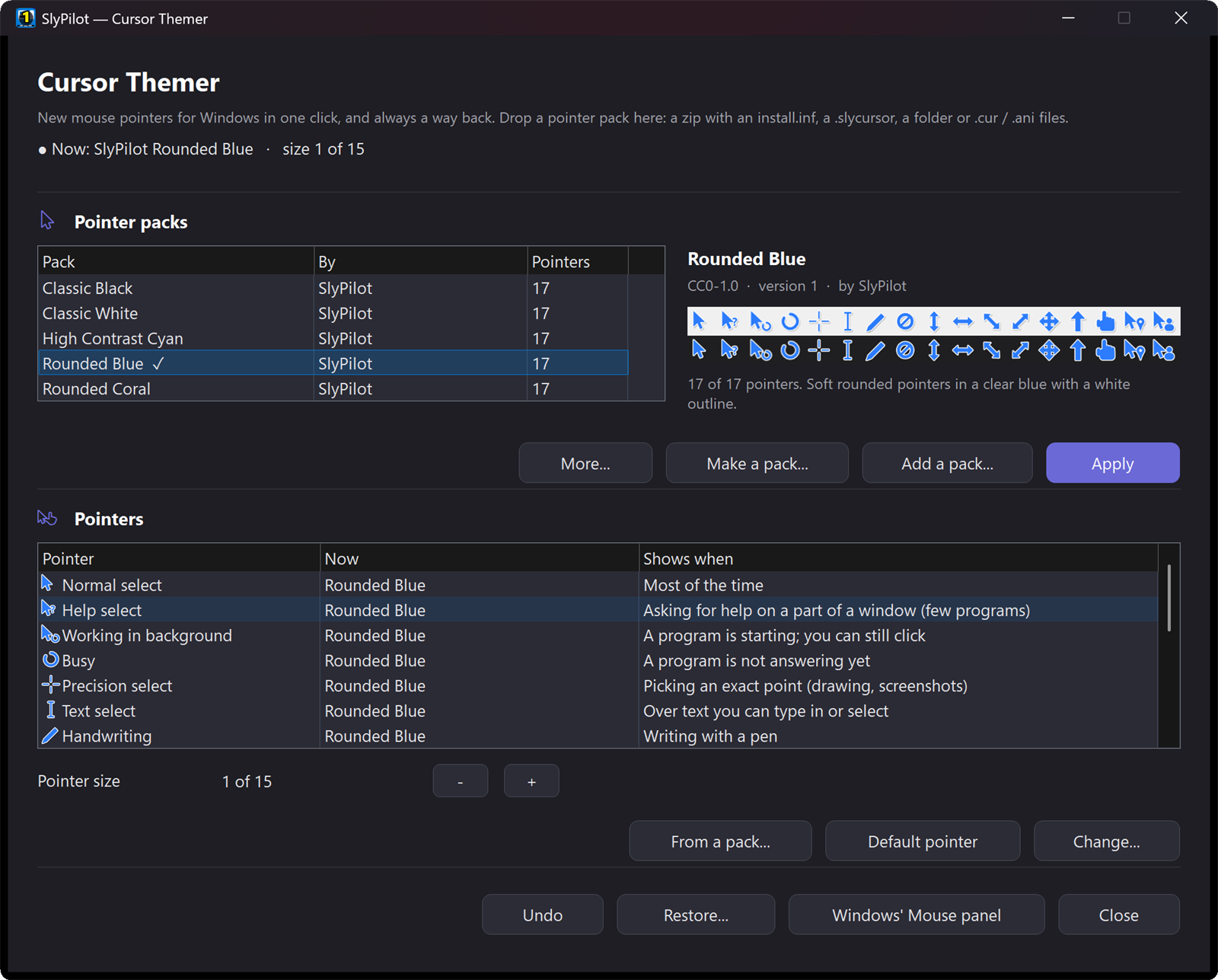
The seventeen pointers Windows uses are listed by what they are and when they show, each with a picture of the one in use: Normal select (most of the time), Text select (over text), Busy (a program is not answering), Link select (over a link), the four resize arrows, Unavailable, Handwriting and the rest.
- Change... gives one pointer a
.cur,.anior.pngfile of yours. - From a pack... takes that pointer from another of your packs: mix and match.
- Default pointer gives Windows' own back for that one.
- Pointer size with − and +, the same sizes as Windows' own slider; or say "bigger pointer" / "smaller pointer".
🎁 Pointer Packs in One Click
Drop a pack on the window, use Add a pack..., or double-click a .slycursor file. SlyPilot reads what packs really come as:
- A zip with an
install.inf, the way most packs on the web are shared. The.infis read, never run: no right-click > Install, no administrator prompt, nothing copied into the Windows folder. Packs that come in several sizes (Regular, Large, Extra-Large) offer each one on the card. - A
.slycursor, SlyPilot's own one-file pack. - A folder, or loose
.cur/.anifiles, matched to the right pointer by their names (link, busy, text, Diagonal Resize 2 ...). - A Linux pointer theme (the free themes of KDE, GNOME and the like: a
.tar.gz,.tar.xzor zip with acursorsfolder): SlyPilot reads its pointers (the Xcursor format, every size and animation frame) and matches their names (left_ptr, xterm, watch ...) to Windows' pointers. A theme in several colours offers each one on the card.
A card shows the pack before anything changes: its pointers on a light and a dark background (so you see whether they will show on your windows), animated ones moving, how many of the seventeen it has, who made it and its licence. Pointers a pack leaves out keep Windows' own (Location and Person take its link pointer).
Surprise me. Turn on Surprise Me (a Pack a Day) in the tray and your pointers are another pack every morning (or choose Surprise me now); leave a pack out of it in its menu if you rely on it. It is off until you switch it on, and Undo always goes back.
A big collection stays easy. Right-click a pack and choose Favourite to put a star on it: starred packs come first in the list and in the tray. The tray shows your favourites, the pack that is on and the last ones you used (twelve in all) with All 30 pointer packs... at the end, so a large collection never makes a huge menu.
🛡️ Safe by Design
Pointer files from the web were once a way into Windows (an animated-pointer flaw in 2007). So SlyPilot reads every pointer itself, checks it, and writes a fresh file from its pixels before Windows ever opens it. A damaged pointer is left out with a reason; the rest of the pack still works. Nothing in a pack is ever run.
And because a pointer you cannot see is a real problem, Keep these pointers? counts down 15 seconds after you apply a pack from outside SlyPilot, and goes back by itself if you do not press Keep.
🎨 Pointers Drawn by SlyPilot
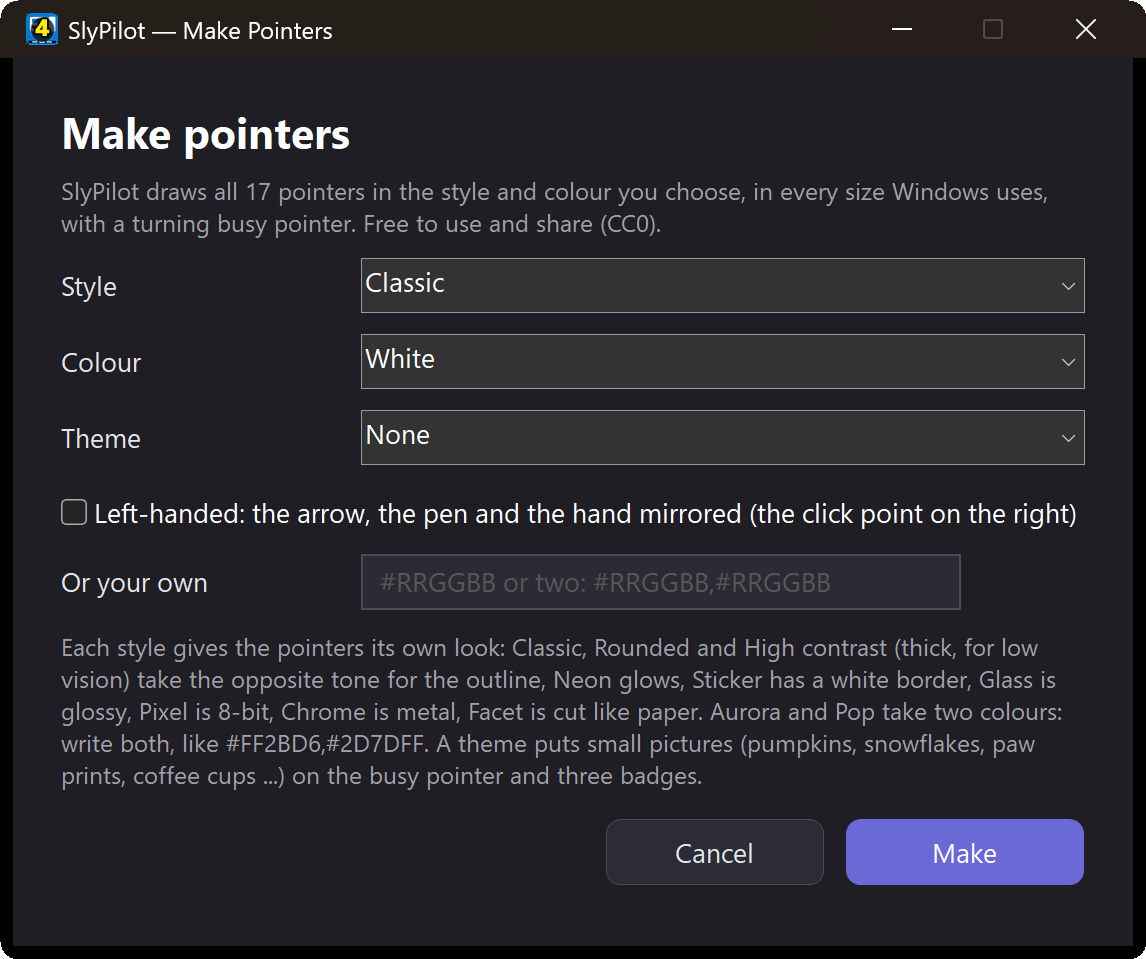
Make a pack... draws all seventeen pointers for you:
- Classic (Windows-like, with a soft shadow), Rounded (soft corners) or High contrast (a thick outline, for low vision),
- in any colour (a list, or your own
#RRGGBB; Aurora takes two,#FF2BD6,#2D7DFF) and sixteen styles (and twenty-two themes: pumpkins, bats, ghosts, skulls, sugar skulls, marigolds, papel picado, candle flames, snowflakes, rockets, paw prints, fish, butterflies, clovers, hearts, coins, suns and clouds, coffee cups, vinyl records, clocks, compasses or strawberries take the place of the busy pointer and the little pictures on three pointers; a left-handed box mirrors the arrow, the pen and the hand): Classic, Rounded, High contrast, Neon (a dark pointer with a glowing edge), Sticker (a coloured pointer in a white border), Aurora (two colours blended), Glass (glossy), Pixel (8-bit blocks), Chrome (polished metal), Pop (a comic outline and a solid colour shadow) and Facet (a lit and a shaded half), - in every size Windows uses, with a busy pointer you choose: a turning ring, three hopping dots, a comet of dots, a breathing dot or equaliser bars (a theme brings its own).
You see the result while you choose: a preview of the pointers on a light and a dark background follows every change, and Surprise me picks a style, a colour and sometimes a theme for you. They are made on your PC and free to use and share (CC0). The first time you open the Cursor Themer, two are there already: SlyPilot Classic (white) and SlyPilot High Contrast (yellow). More are in the pointer gallery.
🎁 Matching Sets: Pointers and Sounds Together
Tray > Utilities > Matching Sets (Pointers and Sounds)... puts on a pointer pack and a sound pack that belong together, in one click: Arcade (coin pointers and chiptune sounds), Haunted night, Winter, Deep space, Ocean, Garden, Dia de Muertos, Calm focus, Neon night, Coffee shop and Paper and music box. The first time you use a set, SlyPilot draws both packs on your PC in a few seconds (nothing is downloaded); after that it is instant. Save what is on now keeps your own pair, Surprise me picks one, and Undo puts back the pointers and the sounds you had. Say “use the winter set”, “surprise me with a set” or “which set is on”.
↩️ Always a Way Back
- Undo says what it undoes.
- Restore...: Windows' own pointers, or yours from before SlyPilot (saved once, before its first change).
- When Windows replaces your pack (a Windows theme, the Mouse panel, the pointer style in Settings), SlyPilot asks whether to put it back, or does it by itself if you tick that. A size change alone is not a reason to ask.
- Uninstalling SlyPilot puts your old pointers back.
- By voice: "restore windows pointers".
🧑🏫 Presenting, Modes and Low Vision
- Presenting mode can make the mouse pointer bigger while you present, and puts it back when you stop.
- Modes (Deep work, Meeting, your own) can set a Pointer pack and a Pointer size while they are on, and give back exactly what you had.
- The Low vision starting profile makes the pointer bigger, and High contrast packs show on any background.
🔗 Share Your Pack
Share this pack... (in the pack's menu) makes one .slycursor file with its credits and licence inside, when its licence allows passing it on. A friend double-clicks it and sees it on the card.
🗣️ Voice, Command Line and Agents
- Voice: "cursor themes", "next pointer pack", "previous pointer pack", "use pointer pack ", "which pointer pack is on", "surprise me with pointers", "pointers every day on" / "off", "restore windows pointers", "bigger pointer", "smaller pointer", "get more pointer packs".
- Tray > Utilities > Pointer Pack: your packs, Windows' pointers, bigger and smaller.
SlyPilot.exe cursor-themer apply <pack>,restore windows,next,bigger,size <1-15>(see command line).- An AI assistant can list the packs, apply one, change the size or give Windows' pointers back (
agent cursors ..., see the agent API). A pack it applies from outside SlyPilot still shows you Keep these pointers?.
How It Compares
| Windows' Mouse panel | Settings (Accessibility) | SlyPilot Cursor Themer | |
|---|---|---|---|
| Pointers in plain words, with when they show | names only | no | yes, with pictures |
| Install a pack | right-click the .inf > Install (admin) | no | one click, no admin, a card first |
| Pointer files checked before Windows reads them | no | n/a | yes, every one rewritten |
| Make pointers in any colour | no | Windows' own pointers in one colour | all 17, sixteen styles, any colour |
| Size | no | yes | yes, the same sizes |
| Undo, and your own pointers back | no | no | yes |
| Packs per mode, bigger while presenting | no | no | yes |
| Voice and command line | no | no | yes |
More, including Stardock's CursorFX, in Cursor Themer vs. the Mouse panel, Settings and CursorFX.
Good to Know
- The sign-in screen and some games and remote-desktop windows draw their own pointer; the Cursor Themer changes the pointer of your Windows session.
- Settings' own pointer colour and size still work; if you pick a Windows pointer style there, SlyPilot notices it replaced your pack and asks.
- The Microsoft Store version keeps packs in
Pictures\SlyPilot Pointers, so the pointers keep working if it is removed.
Privacy
SlyPilot asks the internet for nothing about pointers until you open Get more packs...: then it reads the gallery's list on slypilot.com (kept for a day) and downloads a pack only when you choose it. See the privacy policy.