
SlyPilot Release Notes & Changelog
Complete release history for SlyPilot Free Core (MIT) and SlyPilot Pro.
Track every architectural milestone, feature addition, and hardware refinement across SlyPilot Desktop Helpers.
October 2026 Release Wave - Power Tools, Accessibility, Themers & Pro Superpowers
Twelve major new free and Pro capabilities added to the unified SlyPilot cockpit.
Sound Themer & Free Sound Gallery (Free)
Customize every Windows sound event in plain English, install .slysound, .ths, Windows .themepack and Linux sound themes in one click, auto-fill missing cues, level volumes, set quiet hours, and browse the free CC0/open-source Sound Gallery.
Explore Sound ThemerCursor Themer & Pointer Gallery (Free)
Apply custom mouse pointer packs in one click without administrator rights (every .cur/.ani verified and rewritten cleanly), generate custom-colored pointers on your PC, auto-enlarge while presenting, and browse the free CC0 Pointer Gallery.
Explore Cursor ThemerHead Mouse via Webcam (Free)
Move the mouse pointer smoothly with your head using your existing webcam (SlyHead.exe) and click by holding still (dwell click), paired with over 550 voice commands for complete hands-free control.
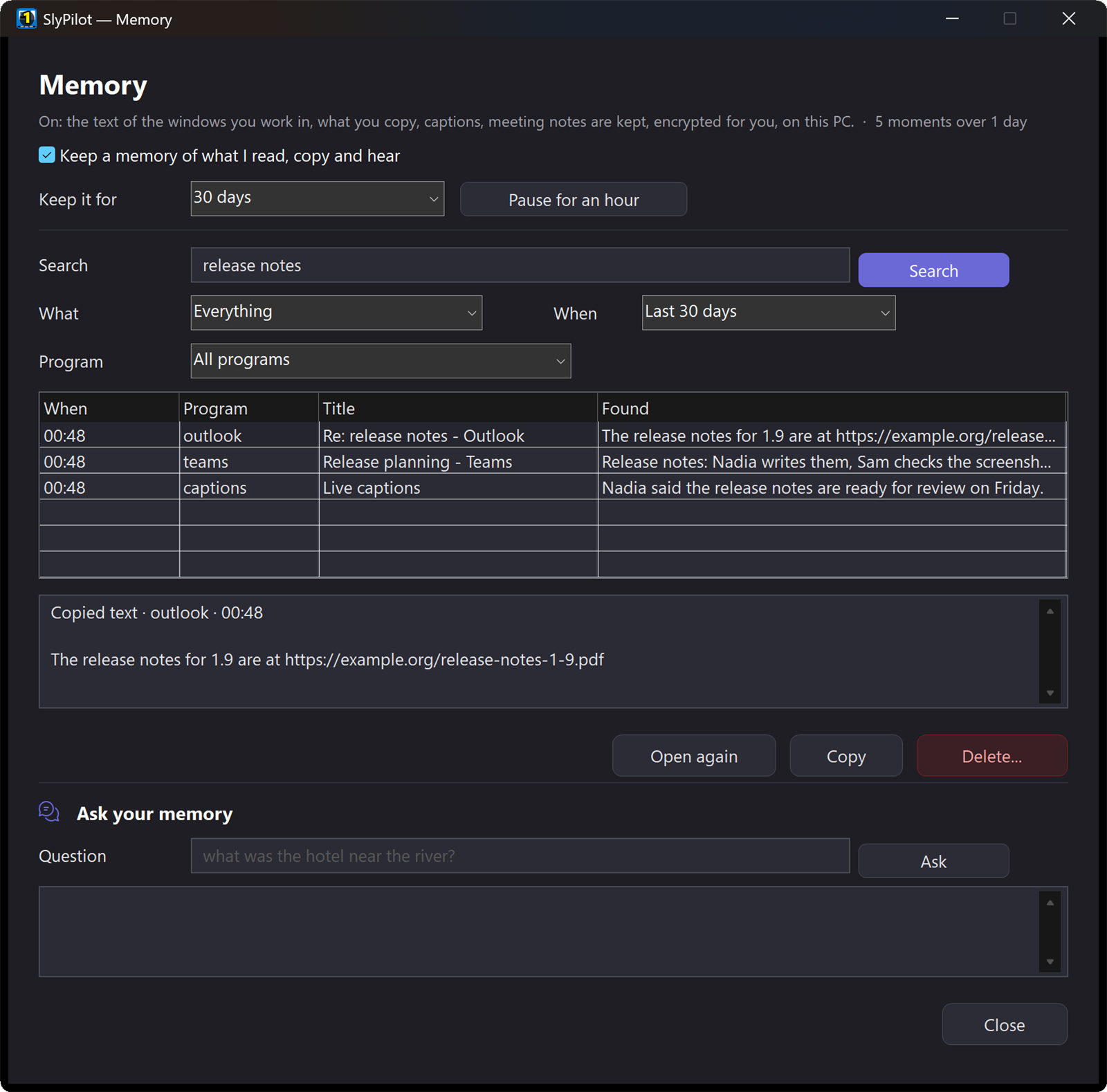
Explore Head MouseMemory: Search & Ask What You Saw or Heard (Pro)
Type 'h budget invoice' in the palette to find anything you read, copied, or heard in a call. Text only (never screenshots or keystrokes), DPAPI-encrypted on your PC, with strict privacy exclusions decided in the MIT core.
Explore MemoryLive Captions & Meeting Copilot (Pro)
Real-time captions for any call or video on any monitor, optionally translated into any language by your AI model, plus a corner Copilot card with 'Summary', 'Action items', 'What did they ask?' and 'Catch me up'.
Explore Captions & CopilotSettings Sync Across Your PCs (Pro)
Keep your Touch Bar buttons, snippets, macros, shortcuts, automations, rules, and workspaces in step across your PCs through a folder you already share (OneDrive, Dropbox, or network share) with no cloud account.
Explore Settings SyncFiles & Explorer: Peek, Rename, Resize & Tidy (Free)
Press Space on any file in Explorer for an instant large preview that follows arrow keys, search files with 'f' in the palette, batch-rename files or resize pictures by voice with live preview and undo, and tidy folders by rule.
Explore File ToolsDisplay Switches, Volume Mixer & Headphones (Free)
Ctrl+Alt+Win+B opens a touch-friendly card for every monitor's brightness, resolution, scale, and rotation; Ctrl+Alt+Win+X opens per-app volume sliders and one-click Bluetooth headphone connect/disconnect with battery level.
Explore Displays & SoundKey Remap, Mouse Gestures, Cheat Sheet & Ruler (Free)
Remap CapsLock or any key globally or per app, draw right-drag mouse gestures, Alt+drag to move/resize windows from anywhere, hold Ctrl for a live shortcut cheat sheet, and toggle pointer crosshairs or a pixel screen ruler.
Explore Power ToolsAutomations, Modes & SlyPilot Assistant (Free)
Trigger commands automatically when an app opens, on a schedule, or when a mode starts; open the SlyPilot Assistant side panel (Ctrl+Alt+Win+A) to chain multi-step desktop tasks by voice or text.
Explore AutomationsLink Router & Comfort Helpers (Free)
Route clicked links to specific browsers or profiles by domain or source app (or hold Shift to pick), plus Starting Profiles, 11-item Basics Settings, Smart Breaks, Calm Mode, and Undo Window Move.
Explore Link Router550+ Voice Commands & 21-Tool MCP Server (Free)
Expanded built-in voice catalog to over 550 commands (~7,700 phrases) and 21 MCP tools (including slypilot_draw, slypilot_present, slypilot_board, and slypilot_transcribe) for AI assistants.
Explore MCP & Agent APIMagnifier, Presenter Tools, Drawing Board & Screenshots Wave
Visual communication, screen annotation, and low-vision tools built into SlyPilot.
Magnifier & Zoom + Pro Watched Areas (Free + Pro)
Windows Magnifier remote plus SlyPilot's own magnifying glass, typing glass, edge strip, and pixel loupe with 5 colour filters - plus Pro Auto-Switcher, second-screen view, and up to 4 watched areas.
Explore MagnifierPresenter Tools & Presenting Mode (Free)
Spotlight, pointer and click rings, laser pointer, live shortcut banner, on-screen countdown timer, read-aloud line outline, and one-switch Presenting Mode.
Explore Presenter ToolsMulti-Page Drawing Board (Free)
Draw directly over your live screen or on white/black boards with pen, finger, mouse, or voice commands, with multi-page overview and PNG & PDF export.
Explore Drawing BoardAssistants That Point & Draw (Free)
AI assistants circle controls on your screen, walk you through tasks with a step tour, and sketch diagrams on your Drawing Board with their name badge on every mark.
Explore Visual AI MarksScreenshots, Recording & Step Guides (Free + Pro)
Free frozen-screen capture, history, floating pins, OCR copy text, and Quick Redact - plus Pro SlyShot editor, MP4/GIF recording, scrolling capture, and automatic click-to-step guides.
Explore ScreenshotsTouch Shortcut Panels, Touch Strips & Gesture Pad (Free)
Multi-row focus-safe floating panels (Ctrl+Alt+Shift+P) with 8 button modes, automatic UI Automation menu import, and a floating multi-touch Gesture Pad.
Explore Touch BarFoundational Architecture Milestones
How SlyPilot evolved from a zero-latency virtual desktop switcher into a complete Windows cockpit.
Open-Core Architecture & Offline ECDSA Licensing
Clean separation between the MIT open-source core (SlyPilot.exe, SlyUia.exe, SlyAi.exe, SlyHead.exe, SlyBt.exe, SlySound.exe, SlyCursor.exe) and standalone C# Pro binaries (SlyPro, SlyMeet, SlyRemote, SlyTts, SlyShot, SlyHome).
SlyMeet Dual-Channel Meeting Recorder (Pro)
Dual-channel offline meeting recording (microphone + WASAPI loopback PC audio) with visible red indicator, consent window, speaker labelling, and local AI summaries.
45 Natural Neural Voices (SlyTts) & Screen OCR (Pro)
45 offline neural TTS voices across Kokoro (82M), Piper, and Supertonic (66M) for natural document read-aloud (Ctrl+Alt+Shift+L), screen OCR reading, and spoken feedback.
Virtual Desktop COM Engine, Touch Bar & Local Whisper
Zero-latency virtual desktop switching, Zero Focus Loss Win32 tool windows (WS_EX_NOACTIVATE), 18-zone touch snapping, Command Palette (Ctrl+Alt+Space), and local Whisper & Parakeet GPU dictation.
Explore Where SlyPilot Is Going Next
See what is already shipped today, what is in preview, and our principles for future releases.