
SlyPilot Pro: The All-In-One Power Cockpit for Windows
One-time purchase - Perpetual licence (30-day offline lease) - Zero subscriptions - Up to 3 personal PCs
Offline AI Speech Dictation & Voice Editing - Meeting Notes, Live Captions & Copilot - Memory - Encrypted Phone Remote - 45 Natural Voices - Screenshot Editor, Recorder & Guides - Settings Sync
- $39
- One-Time Price
- 3 PCs
- Personal Coverage
- 45 Voices
- Offline AI Voices
- 100% Local Audio
- Privacy & Risk-Free
Perpetual licence (30-day offline lease) with 1 full year of updates included
Use on your desktop, laptop, and Surface tablet (free a PC any time)
Kokoro, Piper & Supertonic neural voices plus local Whisper/Parakeet
No cloud bots, no subscriptions, 30-day money-back guarantee
Continuous AI Speech Dictation • Meeting Notes, Live Captions & a Copilot • Encrypted Phone Remote • 45 Natural Neural Voices • Screenshot Editor & Screen Recorder • Memory • Settings Sync
One-time purchase • Perpetual licence (30-day offline lease) • Zero subscriptions • No accounts, no telemetry • Up to 3 personal PCs
Buy SlyPilot Pro ($39 One-Time) • Compare Free vs Pro • How Activation Works • FAQ
Why SlyPilot Pro?
In a software world overrun by mandatory monthly cloud subscriptions, recurring fees, and intrusive telemetry, SlyPilot Pro takes a radically different approach:
- One-Time Purchase: Buy it once; the version you buy keeps working. No monthly bills.
- 100% Offline Audio & Text: Your voice, meeting transcripts, and keystrokes never leave your machine. No cloud processing, no corporate data mining.
- Hardware-Accelerated Power: Harnesses the GPU and CPU already inside your PC (CUDA, Vulkan, AVX2) for fast, private transcription and neural speech.
- No Accounts, Zero Usage Telemetry: Unlocked with a licence key (
SLY-...) that issues a cryptographically signed 30-day lease for your PC (or an offlineSlyPilot.licfile). No account required and zero usage telemetry.
Cloud dictation tools, meeting-recording bots and remote-control apps are usually monthly subscriptions. SlyPilot Pro covers all of that for a single, one-time payment of $39 and keeps all your data on your own PC.
The 7 Pro Superpowers
SlyPilot Pro unlocks seven specialized, proprietary high-performance parts built in native C# that work seamlessly with SlyPilot's zero-focus-loss desktop engine:
  ┌────────────────────────────────────────────────────────────────────────────────────────┐
  │                                    SLYPILOT PRO                                        │
  │                                                                                        │
  │   🎙️ Offline AI Speech Dictation         👥 Private Meeting Notes & Transcripts        │
  │   • Whisper & Parakeet GPU transcription  • Dual-channel (Mic + PC Audio) recording    │
  │   • Real-time streaming into any app      • 100% offline, zero cloud bots in your call │
  │   • "Scratch that" voice editing          • Automated AI summaries & action items      │
  │   • Custom per-app vocabulary rules       • Searchable directly in Command Palette     │
  │                                                                                        │
  │   📱 Encrypted Phone Remote Control       🗣️ 45 Natural Neural TTS Voices             │
  │   • Phone as trackpad, keyboard & mic     • Human-grade Kokoro, Piper & Supertonic     │
  │   • Zero phone install (runs in browser)  • Offline text-to-speech for any selection   │
  │   • Encrypted local Wi-Fi pairing         • Screen OCR read-aloud & dictation playback │
  │   • Low-latency desktop screen stream     • Fully customizable speeds and voice roles  │
  │                                                                                        │
  │   📸 Screenshot Editor & Screen Recorder  🧠 Memory                                    │
  │   • Arrows, steps, blur, solid redaction  • Find anything you read, copied or heard    │
  │   • MP4 / GIF with sound and clicks       • Text only, encrypted, on this PC only      │
  │   • Scrolling screenshots, guides         • Ask your own AI model about it             │
  │                                                                                        │
  │   💬 Live Captions & Meeting Copilot      🔄 Settings Sync                             │
  │   • Captions of any call, any language    • The same SlyPilot on every PC you use      │
  │   • "What did they ask?" "Catch me up"    • Through your own OneDrive / Dropbox folder │
  └────────────────────────────────────────────────────────────────────────────────────────┘
1. 🎙️ Continuous Offline AI Speech Dictation
Stop typing. Start thinking out loud.
Hold a key or tap the Touch Bar, speak naturally, and watch high-accuracy text stream directly into your active window—without stealing focus or moving your caret.
- GPU & CPU Accelerated: Runs cutting-edge OpenAI Whisper (the model that fits your PC, up to Large v3 Turbo) and NVIDIA Parakeet models locally via CUDA, Vulkan, or AVX2.
- Continuous Live Streaming: Transcribes phrase-by-phrase in real time so you never wait for a massive audio dump at the end of a long paragraph.
- Voice Editing & Punctuation: Say "comma", "new paragraph", "scratch that", "capitalize that", or "bullet that" to format on the fly.
- Per-App Custom Rules: Automatically adapts capitalization, punctuation, and formatting depending on whether you are in VS Code, Slack, Windows Terminal, or Word.
- 38 Languages Supported: Dictate fluently in your native language with local multilingual models.
- Speak One Language, Type Another: say it in Spanish, type it in English (Whisper on your PC), or into any language through your own AI model.
- (Free Core Comparison: The free SlyPilot includes Windows Voice Typing fallback; Pro delivers dedicated offline neural AI models with custom vocabulary, voice editing, and live audio level meters).
Read the full AI Dictation Guide →
2. 👥 Private Meeting Notes & Transcripts (SlyMeet)
Complete meeting records. Zero privacy compromise.
Capture both sides of every Zoom, Teams, Google Meet, or Discord conversation into clean, structured Markdown notes stored on your own drive.
- Dual-Channel Separation: Simultaneously records your microphone ("You") and your PC's audio output ("Them") without complex virtual audio cables.
- Zero Cloud Notetakers: No awkward third-party bots joining your meeting room or recording without permission.
- Local AI Summaries: Automatically generates an executive summary, key decisions, action items, and open questions using your chosen local or external LLM.
- Instant Search in Command Palette: Press
Ctrl+Alt+Spaceand typem budgetto instantly find discussions and quotes from last week's meetings. - Strict Privacy Protections: A prominent red recording indicator stays visible across all desktops; audio slices are processed locally and deleted immediately after transcription.
- Live Captions of Any Call: What your PC plays (Teams, Zoom, Meet, a webinar, a video) as captions in a bar on any monitor, made on your PC, translated into any language by your AI model if you like. Nothing is saved unless you save it.
- The Meeting Copilot: a corner card with Summary, Action items, What did they ask? (the last two minutes) and Catch me up (what you missed while away). Only the stretch you ask about goes to your model; an outside model shows you the lines first.
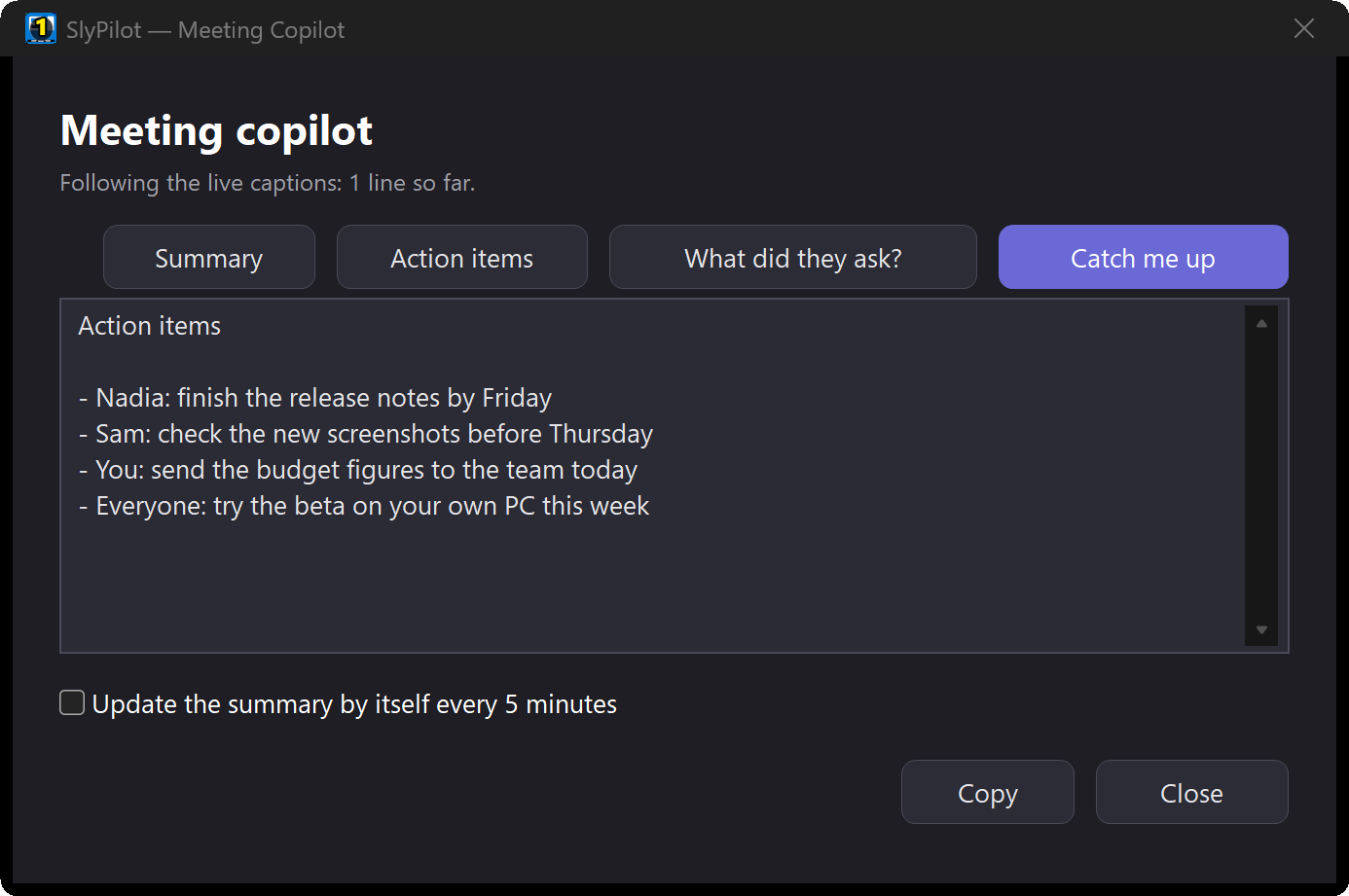
Explore Meeting Notes → · Live Captions & the Copilot →
3. 📱 Encrypted Phone Remote (SlyRemote)
Your smartphone as a cockpit controller for your PC.
Turn your Android phone into an ultra-responsive trackpad, keyboard, wireless dictation mic, Touch Bar companion, and desktop screen mirror.
- Zero Apps to Install: Scan a secure QR code on your PC screen and the remote opens as a web page in Chrome on your Android phone (the browser it was tested with), with nothing to install.
- Private Local Wi-Fi Connection: Connects directly over your local home or office network with TLS encryption and DPAPI-backed tokens. Never touches external cloud servers.
- Couch & Presentation Control: Navigate PowerPoint presentations, control media playback, launch desktop workspaces, or type into your PC from across the room.
- Wireless Push-to-Talk Mic: Use your phone as a high-fidelity wireless microphone to dictate into your PC from anywhere in the room.
- Fine-Grained Permissions: Selectively allow or deny trackpad, keyboard, screen viewing, or system power controls per device.
4. 🗣️ 45 Natural Neural TTS Voices (SlyTts)
Human-quality voice synthesis that sounds like a real person.
Replace the standard Windows voices with 45 natural English voices (US and UK) powered by Kokoro-82M, Piper, and Supertonic.
- Read Anything Aloud: Select text in any application and press
Ctrl+Alt+Shift+Lto listen with play, pause, skip, and speed controls. - Screen OCR Reading: Drag a selection rectangle over any unselectable text (images, locked PDFs, remote desktop windows) and have it read aloud instantly.
- Spoken Proofreading: Hear your written articles, emails, or code read back to you to catch typos and clunky phrasing before hitting send.
- Role-Based Voice Assignment: Assign distinct voices for desktop notifications, voice command confirmations, and long-form document reading.
- 100% Offline Generation: Once downloaded, neural voice generation runs entirely on your local CPU or GPU without sending your documents over the internet.
5. 📸 Screenshot Editor, Screen Recording & Guides (SlyShot)
Show what you mean, then let SlyPilot write the steps.
Taking screenshots is free in SlyPilot: a frozen screen, a history, pins, copy text and Quick Redact. Pro adds the tools that turn a screenshot into an explanation.
- The Editor: arrows, shapes, numbered steps, text and callouts, blur, pixelate and solid redaction, a magnifier, a spotlight and crop. Made for the Surface Pen (pressure, eraser end) and touch. Find secrets covers e-mail addresses, keys and card numbers, and Beautify adds a background and a shadow. Marks stay editable later.
- Screen Recording: an area, a window (even when covered) or a monitor, recorded as an MP4 by your graphics card's video encoder.
- Your microphone and the PC's sound when you tick them.
- Click rings and shortcut badges that never show typed letters.
- Pause, and "stop recording" by voice. Trim without re-encoding, or make a GIF.
- Scrolling Screenshots: a long page or list scrolled and joined into one picture, without moving your mouse.
- Guides: say "record a guide", do the task, say "stop recording".
- Every click becomes a numbered step: a picture of the window, a ring where you clicked and a caption written for you ("Click Save").
- Edit, reorder and redact the steps, then export one HTML file or Markdown.
- What you type is never kept.
- Nothing is uploaded: no upload service, no share link. Your pictures and videos stay in your own folders.
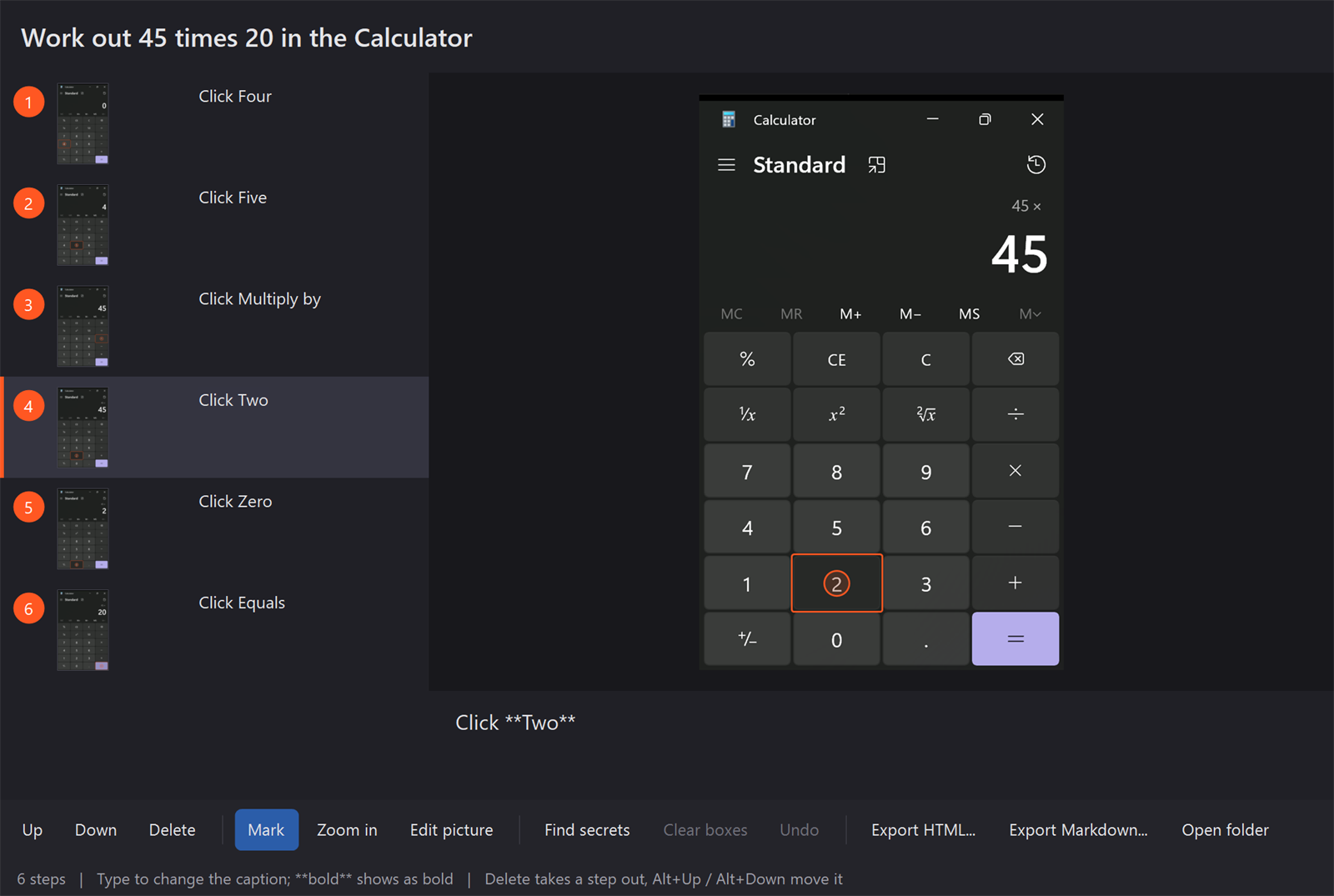
Explore Screenshots, Recording & Guides →
6. 🧠 Memory
Find anything you read, copied or heard on your PC again.
You remember a word or two, not where it was. Type h budget invoice in the command palette and the page, the mail or the chat is back, with the time and the program. Or ask: "what did Nadia say the delivery date was?"
- Text, not pictures: the text of the window you work in (read the way a screen reader does), what you copy, live captions and meeting notes. Never a screenshot, never your keys.
- Never kept: password managers, private windows, sign-in, bank and health sites, protected windows, remote desktops, your exclusions; nothing while you're away or locked. Decided in the free, open-source core.
- On this PC only: encrypted for your Windows account, one file per day, 7 / 30 / 90 days or until you delete it.
- Ask your own AI model: only the lines found go to it; a model outside your PC shows them to you first, every time.
- Any Windows 10 or 11 PC, no special hardware. Off until you switch it on.
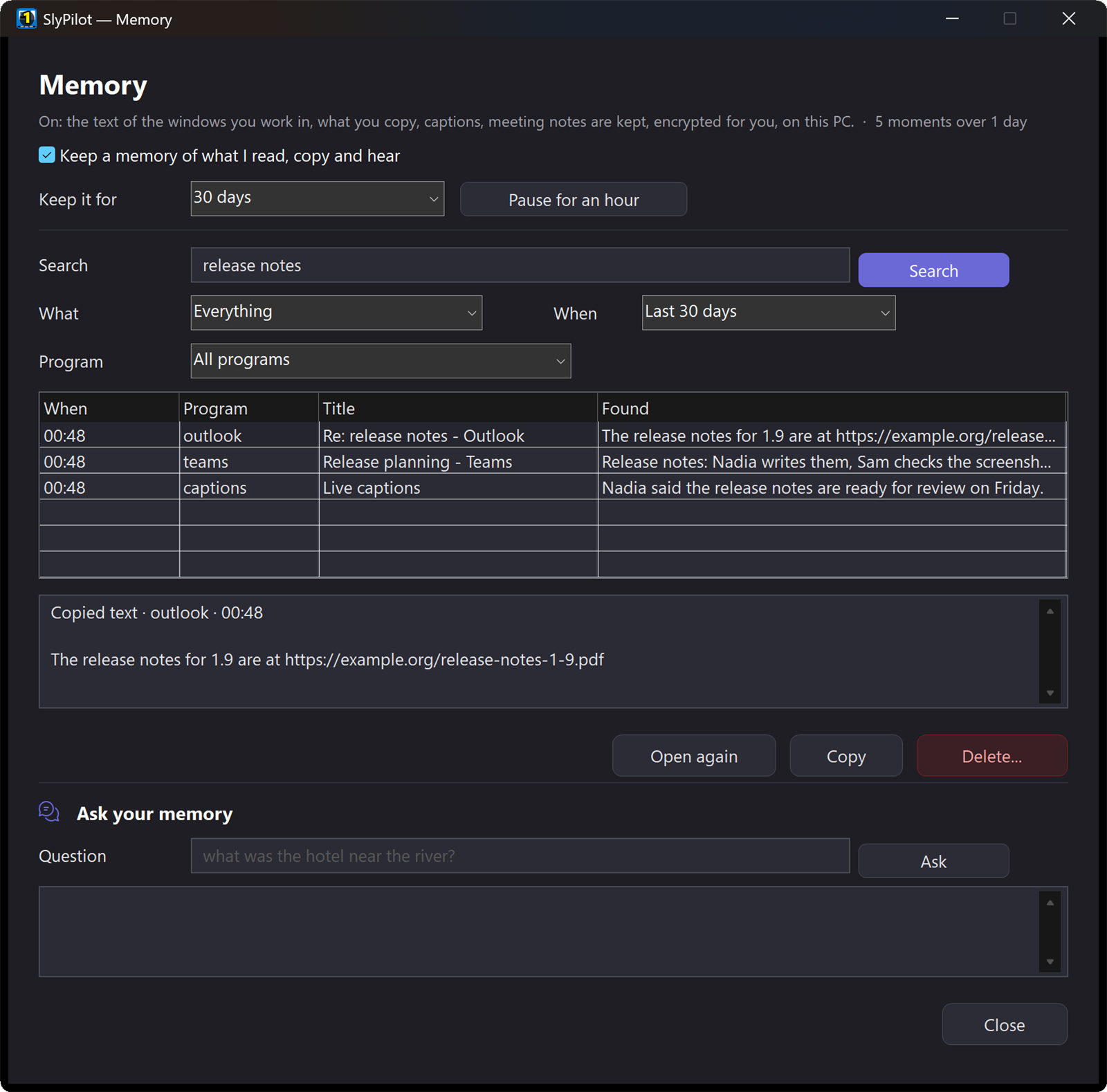
Explore Memory → · Memory vs. Windows Recall →
7. 🔄 Settings Sync
Your SlyPilot, the same on every PC.
Pick a folder your PCs already share (OneDrive, Dropbox, a network folder) and your Touch Bar buttons, text expansions, snippets, macros, shortcuts, automations, rules, desktop names and saved workspaces stay in step, every 10 minutes and after every Save & Apply.
- No account, no SlyPilot cloud: the files sit in your folder.
- What only fits one PC stays there: window places, monitors, the interface size, microphone, speech engines, phone pairing, AI keys.
- A new laptop becomes your SlyPilot in one sync.
Also included: Magnifier extras (SlyPilot Pro)
The Magnifier is free. Pro adds four things to it.
- The Auto-Switcher: a magnifier profile for each program, chosen by itself when the program comes to the front.
- The second-screen view: another monitor shows the magnified area under the pointer, with the pointer drawn in it.
- Up to four watched areas (one is free): small live windows of parts of the screen you want to keep an eye on.
- Record what the magnifier shows as a video, and edit a frozen magnified view in the screenshot editor (copying it as a screenshot is free).
Everything else in the Magnifier, the presenter tools, the drawing board and what an AI assistant does on your screen is free. Explore the Magnifier →
Also included, as a preview: 🏠 Home Link (SlyHome)
Your smart speaker, talking to your PC.
The Google Home, Alexa or Apple Home speaker in your room switches your PC, with no app of ours and no cloud in between: “Hey Google, turn off computer display”, “Alexa, set computer volume to 30 percent”, “Hey Siri, turn on focus mode”.
- The PC as smart home devices: computer display, volume, microphone, brightness, focus mode, lock, desktops, play / pause, and up to 8 devices of your own that run any SlyPilot voice command or macro. Name them the way you want to say them.
- The PC as a sensor: Computer in use and Computer call start automations in your app: the desk lamp when you sit down, an "on air" light while you are on a call. Off until you agree.
- Local Matter: the hub in your home talks straight to the PC over your network, encrypted by Matter. No sound or speech ever reaches the PC.
- Safe with a speaker in the room: nothing that would ask for “confirm” can run, and the lock screen stays locked.
- Preview: tested with Matter's open-source test controller; checks with real hubs are still to come. Google asks for a free one-time developer project and Apple shows an “uncertified” warning, because Home Link is not certified (yet).
Free Core vs. Pro
SlyPilot's core is open source (MIT license) and free forever. Pro adds proprietary C# neural engines and heavy-duty productivity servers:
| Feature / Capability | Free Core (MIT) | SlyPilot Pro ($39 One-Time) |
|---|---|---|
| Virtual Desktops & Workspaces | ✅ Full Access | ✅ Full Access |
| Floating Touch Bar & Thumb Dock | ✅ Full Access | ✅ Full Access |
| Snap Layouts & Window Tools (18 zones) | ✅ Full Access | ✅ Full Access |
| Radial Pie Menu & Surface Dial Tools | ✅ Full Access | ✅ Full Access |
| Surface Pen Instant Drag & Gestures | ✅ Full Access | ✅ Full Access |
| Voice Commands & Control (550+ commands) | ✅ Windows SAPI | ✅ Windows SAPI |
| AI Actions on Selected Text (Local/Cloud LLMs) | ✅ Full Access | ✅ Full Access |
| Everyday Utilities (Mute, Expander with fill-ins, Clipboard, OCR, Translate an Area, Link Router) | ✅ Full Access | ✅ Full Access |
| Power Tools (Key Remap, Mouse Gestures, Alt+Drag, Crosshairs, Screen Ruler, Cheat Sheet) | ✅ Full Access | ✅ Full Access |
| Files & Explorer (Peek with Space, File Search, Rename, Resize, Tidy) | ✅ Full Access | ✅ Full Access |
| Display Switches, Volume Mixer & Bluetooth Headphones | ✅ Full Access | ✅ Full Access |
| Sound Themer, Cursor Themer & Matching Sets (94-Pack Pointer & 20-Pack Sound Galleries, 16 Styles) | ✅ Full Access | ✅ Full Access |
| Head Mouse (camera, clicks by holding still) | ✅ Full Access | ✅ Full Access |
| Comfort Helpers (Breaks, Calm Mode, Undo Window, Profiles, Basics Settings) | ✅ Full Access | ✅ Full Access |
| MCP Server & Agent Automation API | ✅ Full Access | ✅ Full Access |
| Speech Dictation Engine | Windows Voice Typing (Win+H) | Continuous GPU/CPU Whisper & Parakeet |
| Dictation Voice Editing ("Scratch that") | ❌ | Full Voice Formatting & Corrections |
| Per-App Custom Dictation Vocabulary | ❌ | Custom Dictionaries & Replacement Rules |
| Meeting Notes & Dual-Channel Transcripts | ❌ | Local Transcripts + AI Summaries (SlyMeet) |
| Live Captions (any language) & the Meeting Copilot | ❌ (Windows Live Captions is free in Windows) | Captions on any monitor, translated; Summary, Action items, What did they ask?, Catch me up |
| Memory: find anything you read, copied or heard | ❌ | Text only, encrypted, on this PC; Ask your model |
| Settings Sync between your PCs | Backup & Restore by hand | Through your own shared folder |
| Phone Remote Control via Wi-Fi | ❌ | Trackpad, Keyboard, Mic & Screen (SlyRemote) |
| Natural Neural TTS Voices | Windows Standard Voices | 45 Kokoro, Piper & Supertonic Neural Voices (English) |
| Screenshots (frozen screen, history, pins, copy text, Quick Redact) | ✅ Full Access | ✅ Full Access |
| Magnifier (Windows Magnifier remote, glass, typing glass, strip, pixel loupe, one watched area, profiles, freeze) | ✅ Full Access | ✅ Full Access |
| Magnifier extras: Auto-Switcher, second-screen view, up to four watched areas, record and edit the magnified view | ❌ | Included (SlyPro) |
| Presenter tools, Presenting mode & the drawing board | ✅ Full Access | ✅ Full Access |
| Assistants that point, draw and present (marks, tour, board) | ✅ Full Access | ✅ Full Access |
| Screenshot Editor, Screen Recording, Scrolling Screenshots & Guides | ❌ | Editor, MP4 / GIF, Long Pages & Guides (SlyShot) |
| Home Link: Google Home, Alexa, Apple Home | ❌ | Preview: the PC as Matter devices (SlyHome) |
| Updates & Perpetual Validity | Free Forever | 1 Year of Updates + Perpetual Use |
| Telemetry & Accounts | Zero (None) | Zero (None) |
Pricing & Licensing
We believe software should be an asset you own, not a monthly rent you pay:
SlyPilot Pro Licence
$39
Single one-time payment • No subscriptions • 30-day money-back guarantee
What is Included with Your Purchase:
- Perpetual License (30-Day Offline Lease): Activate your
SLY-...key once online to get a signed 30-day lease for your PC (renewed automatically about twice a day while online; offlineSlyPilot.licfiles are also supported). - Up to 3 Personal PCs: Use your single license key across your primary desktop, work laptop, and Surface tablet. Click Remove licence in the Pro window (or visit
slypilot.com/account/licences) any time to free a PC for a new one. - 1 Full Year of Updates: Free access to every minor and major update, new feature, and performance enhancement released over the next 12 months.
- Continued Use: Even if you choose not to renew update coverage after a year, the version you bought remains active and licensed.
- No Accounts & Zero Usage Telemetry: No mandatory accounts, no passwords, and no usage or voice telemetry. Activation sends only the key, an anonymous one-way-hashed PC ID, your PC name,
"win32", and the Pro version. - 30-Day Money-Back Guarantee: If SlyPilot Pro doesn't dramatically streamline your daily workflow, simply email us within 30 days for a full, courteous refund.
How Activation Works
Activation takes less than 10 seconds and requires no account creation:
 1. Purchase Pro            2. Receive Your Key          3. Activate in 1 Click
 ┌─────────────────┐        ┌──────────────────┐         ┌─────────────────────────┐
 │ Checkout on     │ ─────► │ Check your email │  ─────► │ Open SlyPilot Pro Window│
 │ slypilot.com/pro│        │ for SLY-... Key  │         │ Paste Key & Activate    │
 └─────────────────┘        └──────────────────┘         └─────────────────────────┘
                                                                      │
                                                                      ▼
✅ Unlocked (30-Day Offline Lease)- Get Your License Key: Immediately after checkout, you receive your licence key (
SLY-XXXXX-XXXXX-XXXXX-XXXXX) by email. - Open the Pro window: In SlyPilot, right-click the tray icon → Help and Backup → SlyPilot Pro... (any locked Pro entry opens it too).
- Activate: Paste your
SLY-...key into the box (or drop an offlineSlyPilot.licfile on the window) and click Activate. (The window saves the signed lease in the right folder, also for the Microsoft Store version. Keep the e-mail: a settings backup does not include the licence.) - Done: SlyPilot exchanges the key for an Ed25519-signed 30-day lease (
SlyPilot.lease) for your PC. All Pro features unlock immediately with no restart required, and keep working offline for up to 30 days between automatic renewals.
Frequently Asked Questions
Does SlyPilot Pro require an active internet connection?
Only briefly to activate or renew its 30-day lease. All Pro features (Whisper dictation, meeting recording and live captions, phone remote, neural voices, the screenshot editor and recorder, and Memory) run 100% locally on your hardware—your voice, text and screenshots never leave your PC. (The parts that use an AI model—summaries, the meeting copilot, translated captions, Ask in Memory—use the model you chose; one on your PC keeps everything local. Settings sync writes to the folder you chose.) When you activate a SLY-... licence key, SlyPilot gets a signed 30-day lease (SlyPilot.lease) from slypilot.com and renews it about twice a day while running; if you go offline, Pro keeps working for up to 30 days until the lease expires. (An offline SlyPilot.lic file is verified on your PC only and never makes network requests.)
What happens when my 1 year of updates ends?
Your software continues to work indefinitely! You retain a perpetual license for every version released up to your expiration date. If you wish to receive future feature updates and new model architectures after year one, you can optionally renew your update maintenance at a discounted rate, but you are never forced to.
Can I install my license on both my desktop and laptop?
Yes. A standard personal license covers up to 3 personal PCs owned and operated by you (e.g., home workstation, office laptop, Surface tablet). If you replace a computer, click Remove licence in the SlyPilot Pro window (or sign in with your checkout email at https://slypilot.com/account/licences) to free that seat for your new PC.
How does SlyPilot Pro compare to Wispr Flow or Superwhisper?
Wispr Flow is a cloud subscription starting at about $12–$15/month ($144+/year) that sends your voice over the internet to remote servers. Superwhisper is a Mac-first tool with subscription pricing. SlyPilot Pro is a one-time $39 purchase designed specifically for Windows 10 and 11, combining offline AI dictation with virtual desktops, touch navigation, meeting transcripts, and phone remote control.
What hardware do I need for offline AI dictation and voices?
- GPU (Recommended): Any modern NVIDIA GPU with CUDA or AMD/Intel GPU with Vulkan acceleration speeds transcription up a lot.
- CPU: Any multi-core Intel Core i5/i7/i9 or AMD Ryzen processor runs Whisper Small or NVIDIA Parakeet smoothly using AVX2 instructions.
- The AI Speech setup picks a model that fits your PC and shows every file, its size and its source before anything is downloaded.
What is your refund policy?
We offer a hassle-free 30-day money-back guarantee. If you are unsatisfied for any reason, reach out to support with your license ID within 30 days of purchase for a prompt refund.
Ready to supercharge your Windows experience?
Get SlyPilot Pro Today for $39 →
Have questions before purchasing? Read our full Documentation or Review the Architecture.
Choose Your License
Software as an asset you own. Single one-time payment. 30-day money-back guarantee.
Free Core
Open-source under MIT license. Everything you need for zero-latency desktop navigation, touch panels, voice control, and free screenshots.
$0/forever
- Virtual Desktops & Multi-Monitor Workspaces
- Zero-Focus-Loss Touch Bar, Peek Pill & Floating Touch Shortcut Panels ('From menus...')
- Radial Pie Menu, Surface Dial Tools & Driverless Surface Pen Buttons
- 18-Zone Touch Snap Layouts & Multi-Monitor Fling
- Command Palette, '? What Can It Do?' & Universal Desktop Search
- Over 550 Voice Commands, 'Show Numbers' Overlay & 'Record What I Do' Macros
- Sound Themer, Cursor Themer & Matching Sets (20-Pack Sound & 94-Pack Pointer Galleries, 16 Styles, Safe Rewriting)
- Webcam Head Mouse (Dwell Click), Key Remap, Mouse Gestures, Crosshairs & Screen Ruler
- Files & Explorer Tools (Peek with Space, File Search, Rename Files, Resize Pictures & Tidy)
- Display Switches, Per-App Volume Mixer & Bluetooth Headphones Card
- Magnifier (Glass, Typing Glass, Strip, Loupe), Presenter Tools & Multi-Page Drawing Board
- Screenshots: Frozen-Screen Selector, History, Zero-Focus Pins, OCR Copy Text & Quick Redact
- AI Text Actions on Selected Text, Automations & Modes, and SlyPilot Assistant
- 21-Tool MCP Server & Agent Automation API (Assistants That Point, Draw & Present)
- Zero Telemetry & Zero Accounts in Program
Perpetual License
SlyPilot Pro
The complete power cockpit. Unlocks all 7 Pro parts - local GPU speech & voice editing, meeting transcripts & live captions + copilot, Memory, phone remote, 45 natural voices, screenshot editor/recorder/guides, and settings sync - plus Magnifier extras and the Home Link preview.
$39/one-time
- Everything in Free Core included
- 1. Continuous GPU/CPU AI Speech Dictation (Whisper Large v3 Turbo & Parakeet, 38 Languages, Voice Editing)
- 2. Meetings: Private Dual-Channel Notes, Translated Live Captions & Meeting Copilot ('What did they ask?', 'Catch me up')
- 3. Encrypted Phone Remote (SlyRemote: Chrome on Android over local Wi-Fi)
- 4. 45 Natural Neural TTS Voices (SlyTts: Kokoro, Piper, Supertonic; English)
- 5. Screenshot Editor, MP4/GIF Screen Recording, Scrolling Screenshots & Step-by-Step Guides (SlyShot)
- 6. Memory: Search & Ask Anything You Read, Copied or Heard (Text-Only, DPAPI-Encrypted on Your PC)
- 7. Settings Sync Across Your PCs (Through Your Own Shared Folder, No Cloud Account)
- Also Included: Magnifier Extras (Auto-Switcher, Second-Screen View, Up to 4 Watched Areas)
- Also Included as a Preview: Home Link for Google Home, Alexa & Apple Home (SlyHome Local Matter Bridge)
- Online SLY- Key Activation with a Signed 30-Day Offline Lease (or Offline .lic File)
- Up to 3 Personal PCs per Person (1 Full Year of Updates Included, 30-Day Money-Back Guarantee)
Upgrade Your PC to SlyPilot Pro Today
Instant SLY- key delivery by email - 30-day offline lease - 30-day money-back guarantee
Instant digital delivery of your SLY- licence key - 30-day offline lease - 30-day money-back guarantee