
Command Palette & Search
One box for everything SlyPilot can do. Press Ctrl+Alt+Space, type a few letters, press Enter. The palette searches all of SlyPilot's 550+ commands, your
One box for everything SlyPilot can do. Press Ctrl+Alt+Space, type a few letters, press Enter. The palette searches all of SlyPilot's 550+ commands, your open windows on every desktop, your desktops, your text snippets, your macros and bookmarks, and (if you use them) your AI actions and saved meeting notes, and it runs what you pick on the window you were just working in.
| You want | Type |
|---|---|
| Snap a window, tile, focus mode, mute, anything SlyPilot does | snap left, tile, focus mode |
| Jump to a window, on any desktop | w chrome or @discord |
| Go to a desktop by number or name | d 3 or d code |
| Paste a saved snippet | s sig or $ sig |
| Search only the commands | > mute |
| Run an AI action on the selected text | a fix, a translate german |
| Find something said in a past meeting (with SlyPilot Pro's meeting notes) | m budget |
| Calculate, convert, work out a date or a colour | = 18% of 240, 10 km in mi, friday + 3 weeks, days until 25 dec, #ff8800 (Enter copies the answer) |
| Change the selected text | t upper, t sort, t json, t unique, t snake ... |
| Start a program, or an item you opened recently | o code, o notes @3 (on desktop 3) |
| Find a file by words of its name | f budget 2026 (Enter opens, Shift+Space previews) |
| Find out which feature does something | ? bigger text, ? record my screen, ? lost my cursor |
| Find something you read, copied or heard (Memory, Pro) | h budget invoice |
The same box is a keyboard shortcut for people who cannot or do not want to speak: every voice command can be typed, so it works on a quiet train, on a touch keyboard, from the on-screen keyboard of a tablet, or through the phone remote (SlyPilot Pro), whose Home tab has the same command search.
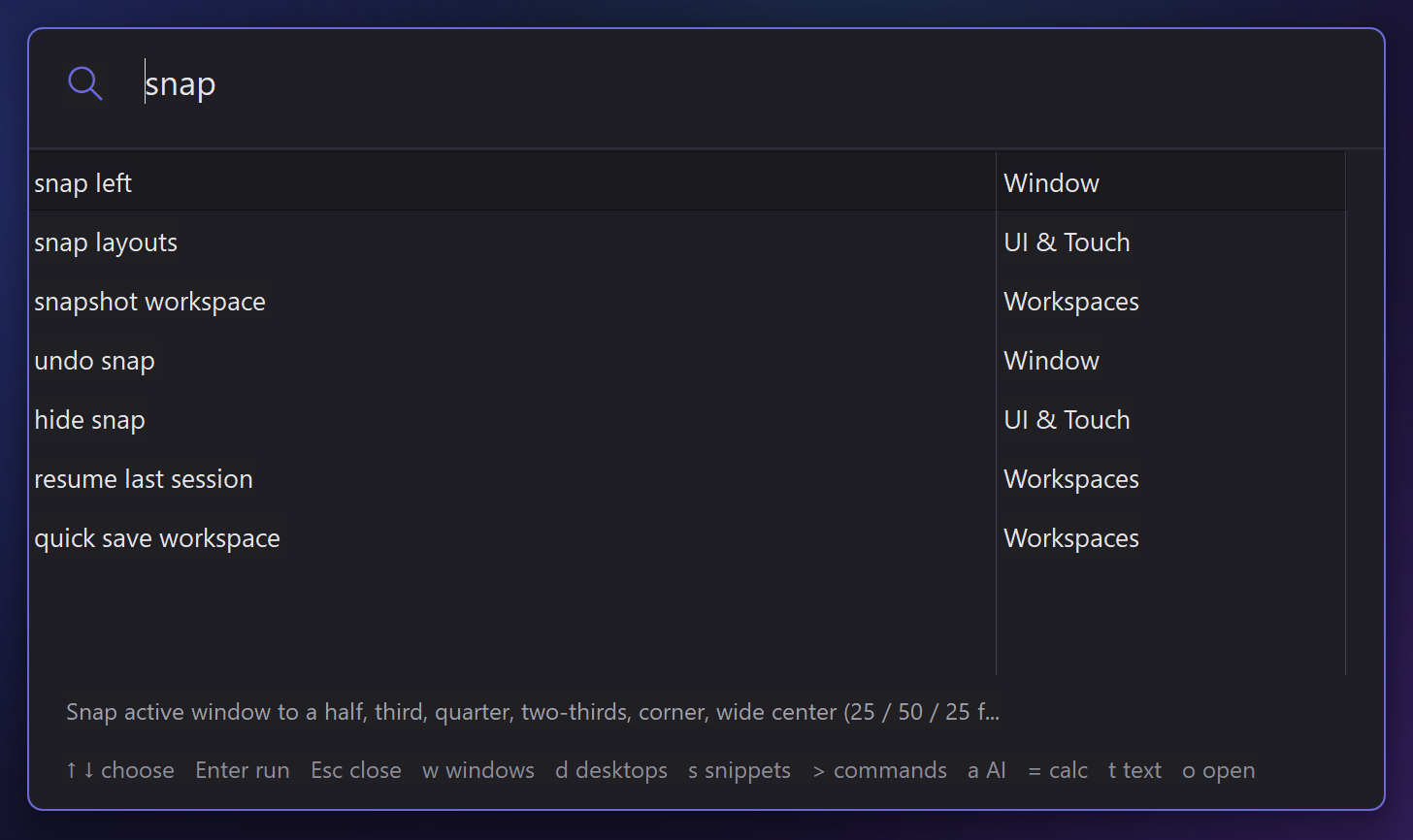
 +-------------------------------------------------------------------------------+
 |  snap left                                                                    |
 +-------------------------------------------------------------------------------+
 |  snap left                          Window                                    |
 |  snap left 1/3 ...                  Window                                    |
 |  snap top left                      Window                                    |
 |  Chrome - Google Docs               chrome  (desktop 2)                       |
 +-------------------------------------------------------------------------------+
   Snap the active window to the left half
   ↑ ↓ choose   Enter run   Esc close   w windows   d desktops   s snippets   > commands   a AI   = calc   t text   o open
(Layout is illustrative.) The line under the list explains the selected row. The palette opens centred in the upper part of the monitor you are working on.
💎 Zero Context Loss: Smart Focus Restoration
A common flaw of command palettes is that running a command happens inside the palette's window, so "snap", "minimize" or "pin" would hit the palette instead of your document.
The palette is the one SlyPilot panel that deliberately takes keyboard focus (you have to type into it), so it protects your target:
- When you press
Ctrl+Alt+Space, SlyPilot remembers the window you were in. - You type and press
Enter(or click, or tap). - SlyPilot closes the palette and gives focus back to your window before the command runs.
- The command acts on the window you meant.
🔎 What the Palette Can Find
- Every voice command. The palette uses the same command list as the voice engine: a command with several spoken forms appears once, and the form that matched your typing is the one shown and run. Commands that belong to another program (a Photoshop pack while you are in Excel) are hidden.
- Things that are yours: named desktops ("go to code"), saved workspaces ("workspace trading"), your own snap zones, macros you recorded, custom commands, aliases, web bookmarks, apps you added, text snippets, and the commands of the voice pack of the program in front.
- A phrase with a number or a name in it ("go to desktop 3", "close notepad") that the voice commands understand is offered as an as typed row, even when it is not in the list.
- Windows and desktops. Type two or more letters and matching windows (this desktop first, then others, with their desktop number) and desktops that you have named are added below the commands.
- Everything goes through one dispatcher. Typed text takes the same path as speech, so commands that ask for a spoken confirm still ask. There is no second, separate command list to go stale.
⚡ Prefix Modes & Direct Filtering
Type naturally, or start with a one-letter prefix (the space after a letter matters; a lone letter stays an ordinary search) to jump into a focused mode:
| Prefix | Mode | Example | What it does |
|---|---|---|---|
> or c | Commands only | > snap leftc mute voice | Searches only SlyPilot's commands, no windows or desktops. |
w or @ | Windows | w chrome@discord | Fuzzy-searches every open window on every virtual desktop and jumps to the one you choose (switching desktop if needed). |
d or # | Desktops | d 3d code | Jumps to desktop N, or to the desktop with that name or emoji. |
s or $ | Snippets | s sig$ template | Pastes a saved text snippet into your active document. Search by name or by words from its text. |
a or ai | Ask AI | a fixa translate germana explain @screen | Runs an AI action on your selected text (or on the screen, the clipboard, your last meeting). Off until you set up AI actions (tray > AI and Meetings > AI Actions Setup...). |
m | Meeting notes (SlyPilot Pro) | m budget | Lists lines from your saved meeting transcripts (summaries included) that contain the words, newest first, with when in the meeting it was said. Enter opens that transcript. Only reads your own saved files, and only while the palette is open. |
f | Files | f budget 2026f invoice march | Finds files whose name has every word, from the Windows Search index Windows already keeps. Enter opens, Ctrl+Enter shows it in its folder, Ctrl+Shift+C copies the path, Shift+Space previews it. (While an AI answer is waiting, f asks a follow-up about it instead: f make it shorter.) Files & Explorer → |
? | What can it do? | ? bigger text? spotify quieter | Type a need in your own words: the palette names the feature that does it, its shortcut as it is on your PC and what it does; Enter opens it. |
h | Memory (SlyPilot Pro) | h budget invoice | Finds what you read, copied or heard on this PC by a few words, with the time and the program; Enter goes back to it. Off until you switch Memory on. |
| (none) | Universal | matrixgo to desktop 3 | Searches commands first, then windows and desktops. |
🕘 Blank Query: Your Recent Picks and Open Windows
Open the palette and type nothing:
- It lists the last things you picked (up to 8: commands, desktops, snippets), kept in memory only.
- With no history yet, it lists your open windows (this desktop first), a bit like Alt+Tab with a search box.
Enterruns the top row;Esccloses.
⌨️ Keyboard, Touch & Mouse
- Navigate:
Up/Down,PgUp/PgDn, orCtrl+N/Ctrl+P. - Run:
Enter, or click or tap a row. - Dismiss:
Esc, or just click another window. - Reach it:
Ctrl+Alt+Space, tray > Touch Panels > Command Palette..., orSlyPilot.exe palette.
Change any shortcut
Ctrl+Alt+Space is also the quick-entry key of some chat apps. SlyPilot lets you move it, and every other shortcut: tray > Help and Backup > Show Shortcuts... is a live, editable list of every shortcut (what it does, the key now, the default and its state). Set a different key, switch one off, go back to the default, or press Check conflicts to ask Windows which of your shortcuts another program has already claimed. Check my setup in the same menu also names conflicts and opens that window.
🔧 Related: Find a Setting
SlyPilot has many settings, so Settings has its own search. Press Ctrl+F while Settings is in front (or the Find... button in the bottom row), type a word (hud, snap zone, wake word), pick a row, and Settings jumps to the right tab and puts the focus on the control.