
SlyPilot for Support & IT Pros
Support work is mostly detective work with too little information. "It does not work" arrives without a Windows build, a settings file, a log or a
Support work is mostly detective work with too little information. "It does not work" arrives without a Windows build, a settings file, a log or a screenshot, and the fix is often a switch buried in a Windows privacy page. On your own side, you spend the day rearranging windows, reaching machines on a shelf, and gluing small jobs together with scripts.
SlyPilot is built to be transparent when something is wrong and scriptable when you want to automate: a built-in Setup Doctor that says what is wrong in plain words, a redacted diagnostics report that is safe to paste into a ticket, a settings file that is plain text with automatic backups, a command line and a JSON agent API for your scripts (all free), and, with the optional SlyPilot Pro, a phone remote for the PC on the shelf.
🩺 1. From "It Does Not Work" to a Diagnosis
The pain: the user cannot say what is wrong, and you cannot see their PC.
With SlyPilot:
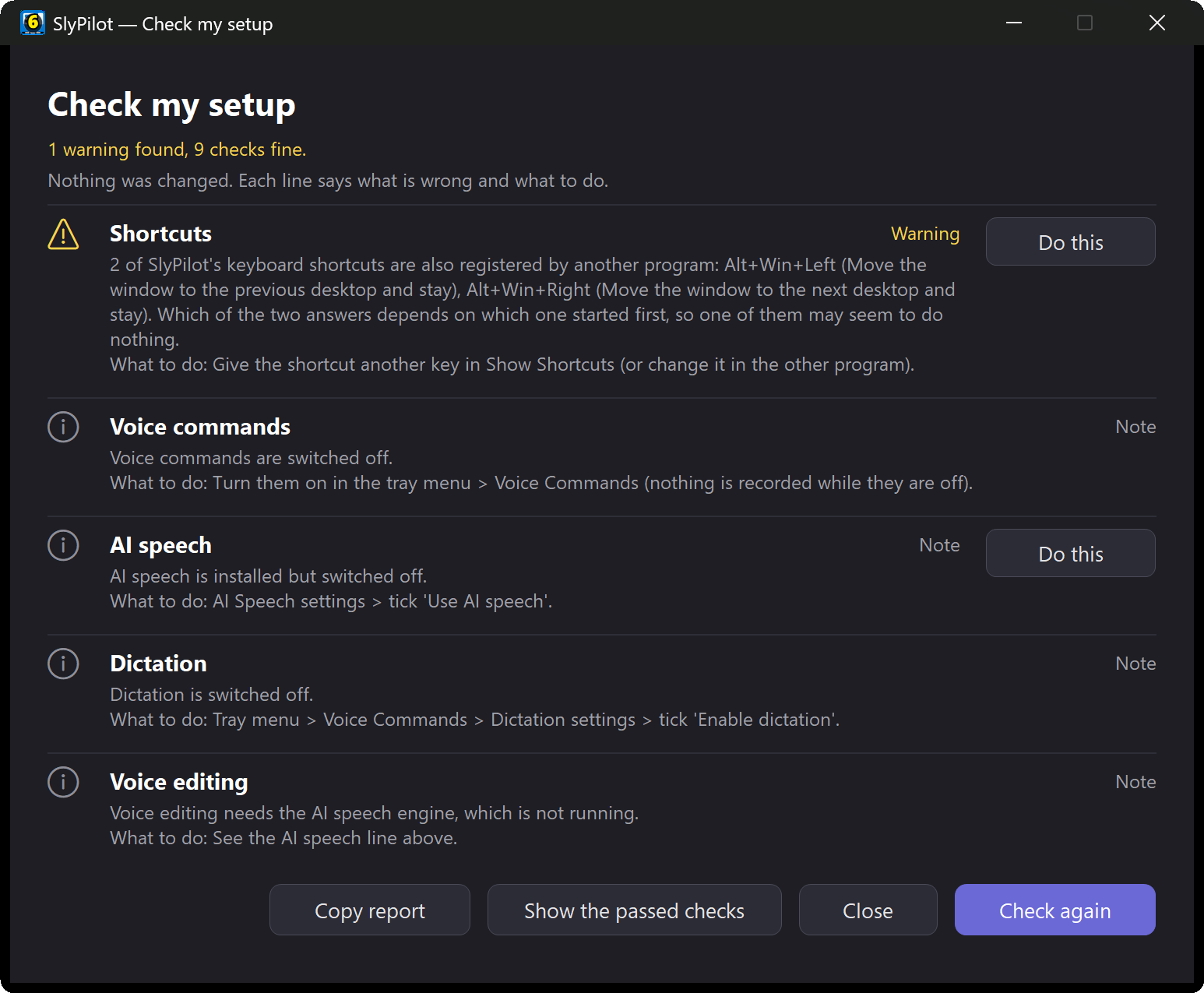
- Ask them to open the tray menu → Help and Backup → Check my setup... (or the Check my setup button in the About window). The Doctor looks at the desktop engine, the microphone and Windows' privacy switches, the speech recognizer, AI speech, dictation, natural voices, the settings folder, keyboard shortcuts that another program has already taken, the phone remote, agent control, meeting notes, recent errors and whether the last AI request failed. It lists problems first, in plain words, with what to do.
- "What I can do for you" offers a few safe fixes: open the right Windows settings page, unblock the downloaded program files, clear the read-only mark of the settings file, open the AI speech setup (which shows a consent window before anything is downloaded). A fix that changes a file asks first, and only a click on that button runs one: no agent, script or voice command can.
- Copy diagnostics (tray → About / Diagnostics...) puts a report on the clipboard with the SlyPilot version, the Windows build, whether the desktop engine works and the Doctor's findings. It is built to be safe to paste: no speech, no user name or PC name, no settings values.
- Report a Problem... (tray → Help and Backup) explains what it does and, after a Yes, copies the same redacted report and opens the project's issue page in your browser. SlyPilot sends nothing itself, and you can paste the report into any ticket system instead.
- Check for problems at start (tray → Help and Backup, on by default) makes the program look by itself shortly after start and tell the user once, in one on-screen message, about a problem that stops a feature working at all.
logs\crash.lognext to the program holds startup and error diagnostics, capped at 2 MB (the previous one is kept aslogs\crash.old.log). What a user dictates or says is not written to it unless someone switches that on for troubleshooting ([Privacy] LogSpeechText=1).
Troubleshooting and the Doctor →
🗂️ 2. A Settings File You Can Read, Back Up and Repair
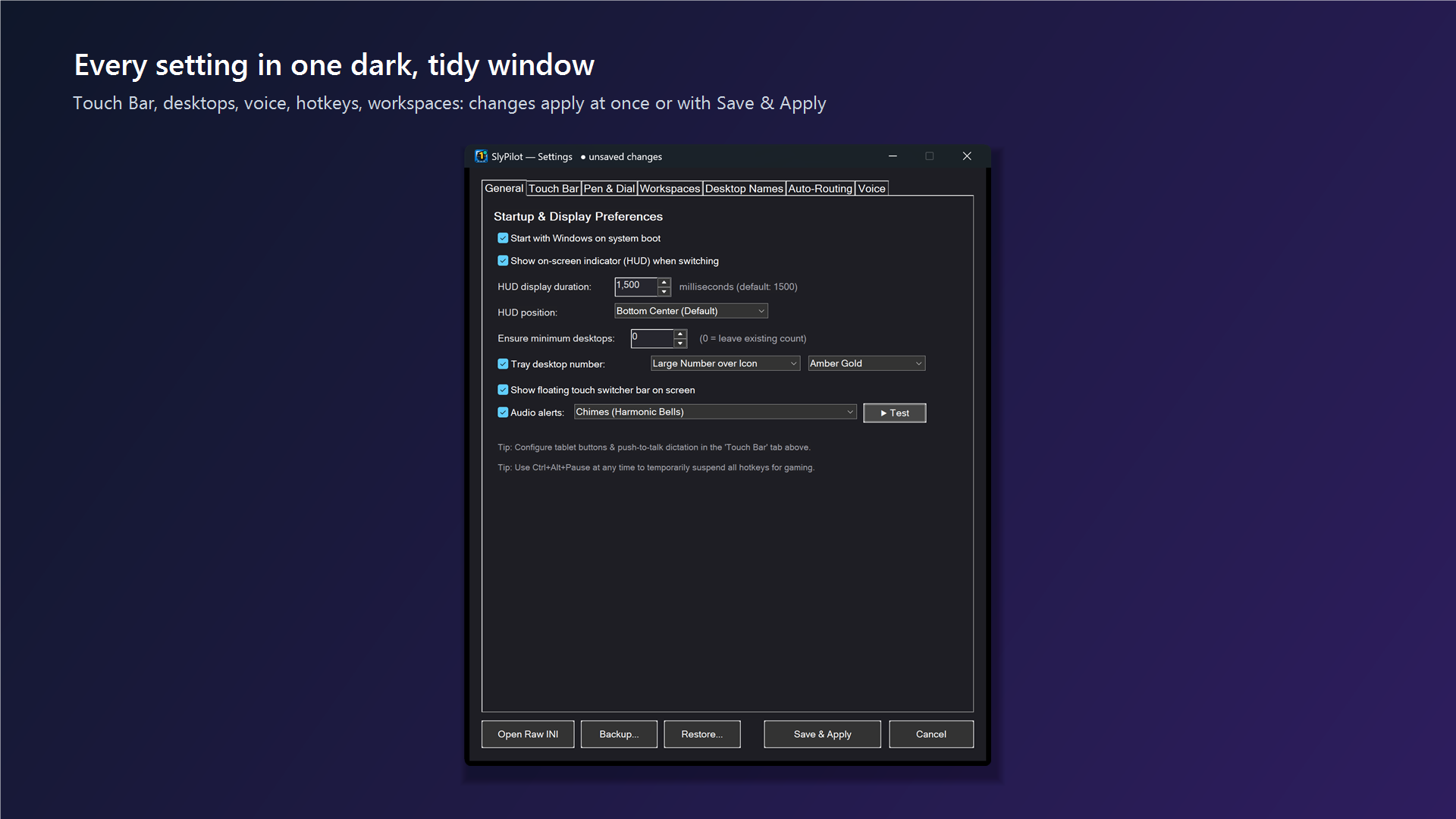
SlyPilot.inisits next to the program, in plain text (UTF-16, so open it with Notepad). Settings → Open Raw INI opens it. Saved layouts are INI files inWorkspaces\.- Backup Settings... and Restore Settings... (tray → Help and Backup, and buttons in the Settings window) export and import your settings.
- Automatic safety net: a few seconds after start SlyPilot checks the settings file. A damaged file (for example one two programs wrote at once) is repaired by itself and the damaged copy is kept; a healthy file is copied once a day, the newest 7 stay, in
%LOCALAPPDATA%\SlyPilot\Backups(tray → Help and Backup → Open Settings Backups Folder). - Moving settings between PCs is safe by design. An API key is stored encrypted for the Windows user and never goes into an exported file, and an imported settings file cannot switch on the box that allows sending text to an outside AI service.
- Keyboard shortcut conflicts: Help and Backup → Show Shortcuts... lists every shortcut with its default and has Check conflicts, which asks Windows which of them another program has already registered.
Ctrl+Alt+Pausesuspends all SlyPilot hotkeys at once. - Config reference: every section and key is in the configuration guide.
🧰 3. Script It: the Command Line, SlyCtl and the Agent API
Everything the tray can do is also a command, so a script, a scheduled task, a macro pad or a Stream Deck can drive it.
SlyPilot.exe /goto 2                  # switch to desktop 2
SlyPilot.exe ws "Helpdesk"            # restore a saved window layout
SlyPilot.exe snap left                # snap the active window
SlyCtl.exe /say "focus mode" # run any voice command by its words- The classic switches hand the command to the running program and exit; they print nothing.
SlyCtl.exe, the small client next toSlyPilot.exe, does the same for/say "<voice command>"and passes every other switch on. These are meant for your own macros and stay available to any program running as you. All switches and a Stream Deck recipe → - The agent API is for scripts that need an answer:
SlyPilot.exe agent <verb>prints one line of JSON and sets an exit code.agent state,agent windows --exe chrome,agent screenshot,agent ocr,agent ui treesee the desktop;agent run snap left --hwnd <h>andagent win ...act on a named window, never on whatever happens to be in front.--field desktop.currentprints a single value as plain text, so a batch file needs no JSON parser. - It is gated on purpose. Agent control is off until someone picks a level in the tray menu (Agent Control). Keyboard-and-mouse and program-launching levels are time-limited and never kept across a restart, and risky requests need a click on an Allow once window. That makes the API good for read-only inspection and supervised automation, and not for unattended keyboard-and-mouse automation.
- Pause everything with
Ctrl+Alt+Shift+F12, the tray menu, or "pause agent control".logs\agent.loglists what each agent did (never what it typed). Password managers and private browsing windows are invisible to agents and painted black in their screenshots; you can add your own programs or window titles. - AI assistants (MCP):
SlyPilot.exe mcpis an MCP server with 15 typed tools for Claude Code, Claude Desktop, Cursor, VS Code and Gemini CLI, behind the same gate.SlyPilot.exe mcp-configprints the setup text. Start at Read only and let the assistant look at a window to explain an error before you give it anything more. MCP & agent automation →
📱 4. Reaching the PC on the Shelf (SlyPilot Pro)
The pain: a lab machine, a media PC, a build box or a family computer needs a nudge, and walking over is the cost.
With the Phone Remote (part of SlyPilot Pro; off until you switch it on, over your own Wi-Fi only, used with Chrome on an Android phone, nothing to install on the phone):
- Screen shows a picture of any of its monitors (live if you like) with Touch mode to click, Keyboard to type and Keys for Win, Alt+Tab and Ctrl, Alt or Shift combinations. View mode cannot click by accident.
- Tools sends files and photos to it, fetches or sets its clipboard, and locks, turns off the screen, sleeps or restarts it (a restart or shutdown waits 20 seconds and can be cancelled).
- Pairing is deliberate: a one-time code shown on that PC's screen (valid 2 minutes), mutual proof of knowing the code, encrypted traffic, and permissions per phone (full control, careful, a guest with buttons and media only, a presentation preset). A removed phone is cut off at once, and
Ctrl+Alt+Shift+F12pauses every phone. - The limits are Windows' limits: a normal program cannot send input to an administrator-level window, the sign-in screen or the lock screen, so the remote cannot either, and nothing can send Ctrl+Alt+Del. It reaches a PC on your own network that is signed in; it is not a remote-support service over the internet, and the first pairing needs someone at that PC.
🛠️ 5. Small Fixes at Your Own Desk
- Windows stranded off-screen after a dock change: "rescue windows" (
Ctrl+Alt+Shift+R) pulls them back; "gather windows" (Ctrl+Alt+Shift+G) brings every window of every desktop here. - What is this window? "inspect window" (or the chip menu's inspect item) shows its program, process ID, size and desktop.
- Quick health by voice: "system status", "what is using cpu", "disk space", "network status", "ping test", "battery status", "display info".
- Windows panels in one phrase: "task manager", "windows update", "display settings", "sound settings", "wifi settings", "startup apps".
- Layouts for the job: snap, tile, a workspace for the ticket queue, a desktop for the ticket tool and another for the remote session.
- Audio and microphone:
Ctrl+Alt+Win+Mmutes every microphone, and an optional ON AIR pill shows which program has the microphone open, handy on support calls.
📸 6. Show, Don't Type: Screenshots and How-To Guides
- A screenshot for the ticket in two seconds: "screenshot this window" (the covered parts too), and paste. "redact the screenshot" covers e-mail addresses, numbers and keys with solid boxes before it leaves your PC; password managers can be painted black automatically. Free.
- Write the how-to once (SlyPilot Pro): say "record a guide", do the fix the way you always do, say "stop recording".
- Each click becomes a numbered step with a picture, a ring where you clicked and a caption such as "Open the Privacy tab".
- Fix the wording, run Find secrets over every picture, and export one HTML file for the knowledge base, or Markdown for a wiki.
- What you typed (passwords included) is never kept.
- Show it moving (SlyPilot Pro): "record this window" makes an MP4 with click rings and shortcut badges. Trim it, or make a GIF for the reply.
See the Screenshots guide.
🔍 7. What You Need to Know When You Evaluate It
- Privacy: the program has no accounts, no telemetry and no analytics. Voice commands and SlyPilot's AI dictation run on the PC (the free program's dictation button opens Windows Voice Typing, a Windows feature that may use Microsoft's online speech service). The network traffic the program starts is: one-time model downloads after a consent window that lists every file, size and source (checked against a published SHA-256); an update check to GitHub that only runs when you click Check for Updates... (or weekly if you tick that, off by default; nothing is downloaded); optional AI actions, which send the text you chose to the model you configured (an outside host needs its own tick); and the ping voice command. Privacy →
- Permissions: it runs as the standard user and does not need administrator rights. The setup installs for the current user (it may show Windows' protected your PC notice because it is not code-signed yet); downloaded speech models live in
%LOCALAPPDATA%\SlyPilot, and uninstalling asks whether to delete your settings and downloaded models too. - Compatibility: virtual-desktop features use Windows internals that Microsoft does not document, so they need Windows 10, or Windows 11 24H2 (build 26100.2605) or newer. The program checks a few seconds after it starts and says so in plain words when something does not match, instead of failing silently.
- Licensing: the core is free (MIT, source included, no licence, no trial, no time limit). SlyPilot Pro is a separate optional purchase (AI dictation, phone remote, natural voices, meeting notes) unlocked by a
SLY-...licence key (activated online for a signed 30-day offline lease, with no account or usage telemetry) or an offlineSlyPilot.licfile. See the Pro page. - Everything optional is off by default: voice commands, dictation, AI actions, meeting notes, the text expander, the phone remote and agent control.
🗓️ A Support Day with SlyPilot
- A ticket: "dictation does nothing." Ask for Copy diagnostics and a look at the Touch Bar's dictation button. A grey button means dictation is off; an amber microphone means the AI engines are not set up (AI dictation needs SlyPilot Pro; without it the button opens Windows Voice Typing).
- A remote user whose voice is not heard. Their Check my setup says Windows has the microphone muted; the offered button unmutes it.
- The build box across the room. (With Pro.) Phone, Screen tab, View mode: the build is finished. Switch to Touch mode, select the result line, copy it with the Keys panel, then fetch the PC's clipboard to your phone from Tools.
- A script.
SlyPilot.exe agent windows --exe chromelists the browser windows as JSON for your inventory script; a macro-pad button runsSlyCtl.exe /say "workspace helpdesk". - End of day. Backup Settings... before changing anything;
Ctrl+Alt+Shift+Sto snapshot tomorrow's layout.
Getting started → · Configuration guide → · Setup Doctor → · All use cases →