
Home Link: Talk to Your PC Through Google Home, Alexa and Apple Home
The smart speaker in your room is already listening. Home Link lets it reach your PC:
SlyPilot Pro, preview. Home Link is part of SlyPilot Pro, the optional one-time purchase (the free SlyPilot works without it). It is a preview: it is built and tested with Matter's open-source test controller, and the checks with real Google, Alexa and Apple hubs are still to come. It is locked until you enter a licence: tray icon > Help and Backup > SlyPilot Pro...
The smart speaker in your room is already listening. Home Link lets it reach your PC:
"Hey Google, turn off computer display."
"Alexa, set computer volume to 30 percent."
"Hey Siri, turn on focus mode."
Your PC shows up in your smart home app as a few devices that you choose and name, like a smart plug does. Say the device's name and the speaker switches it. There is no app of ours to install and no account to make, and nothing goes through a server of ours.
   "Hey Google, turn off                                       PC running SlyPilot
    computer display"                                           ┌────────────────────┐
         │                      your home network               │  Computer display  │ ◄── screen off
   ┌───────────┐    Matter (encrypted, local)                   │  Computer volume   │
   │  Speaker  │ ─────────────────────────────────────────────► │  Focus mode        │
   │  or hub   │ ◄───────────────────────────────────────────── │  Lock computer     │
   └───────────┘    "display is off", "volume 30"               │  your own commands │
                                                                └────────────────────┘
     only "device on / off / level": no sound and no speech ever reach the PC
✨ At a Glance
| Say (Google shown; Alexa and Siri work the same way) | What happens on the PC |
|---|---|
| "Hey Google, turn off computer display" | The screen goes dark; the PC keeps running. "Turn on" wakes it again. |
| "Hey Google, set computer volume to 30 percent" | The PC's volume goes to 30. "Turn off computer volume" mutes, "turn on" unmutes. |
| "Hey Google, turn on focus mode" | Only the window you are working in stays; the others are put away. "Turn off" brings them back. |
| "Hey Google, is focus mode on?" | The answer comes from the PC's real state. |
| "Hey Google, turn on lock computer" | The PC locks. (Nothing can unlock it.) |
| "Hey Google, turn on next desktop" | Switches to the next virtual desktop (also previous desktop and play pause). |
| "Hey Google, mute computer microphone" | Every microphone of the PC is muted, for every program at once. "Turn on" unmutes. |
| "Hey Google, set computer brightness to 40 percent" | The screen brightness goes to 40 (built-in screens of laptops and tablets). |
| "Hey Google, turn on work mode" | Runs any SlyPilot voice command or macro you chose for a device of your own. |
| "Hey Google, set Spotify volume to 40 percent" | A command of your own with a number in it. |
| "Hey Google, tell computer to turn off the display" | Any sentence you like, with a routine in the Google Home app. |
When you change something on the PC yourself (the volume, the mute, the microphone, focus mode, the screen), the app shows the new state too.
🔔 New: Your PC Starts Things in Your Home
Home Link also works the other way round. Two sensors tell your smart home app what the PC is doing, so the app can start automations from it:
| Sensor | It says "occupied" while ... | Automations you could make |
|---|---|---|
| Computer in use | someone uses the keyboard, mouse, pen or touch (and the PC is not locked) | the desk lamp turns on when you sit down and off a few minutes after you leave; the office heating follows you |
| Computer call | a program uses the microphone: Zoom, Teams, Meet in a browser, Discord... | a light outside the door turns red while you are on a call; the music pauses; the doorbell chime goes quiet |
The sensors only say "occupied" or "not occupied". No sound, no names of programs and nothing you do on the PC is sent. They are off until you tick them, and SlyPilot asks you separately before the first one goes on, because the smart home company then learns when you use the PC.
🧩 Why It Is Different
- No new microphone on the PC. The speaker you already have does the listening. Across the room, on the couch, with your hands full.
- Every big ecosystem at once. One PC can be paired with Google Home, Alexa and Apple Home together (Matter calls each one a fabric). SmartThings and Home Assistant speak Matter too.
- Local, not cloud-to-cloud. Other ways to voice-control a PC send every command through the vendor's server. Home Link is a Matter device on your home network: the hub in your home talks straight to your PC.
- It is your PC, so the rules are strict. Only harmless devices are offered, a command that would normally ask you to say "confirm" can never run from a speaker, and nothing unlocks the PC.
🚀 Set Up in About Five Minutes
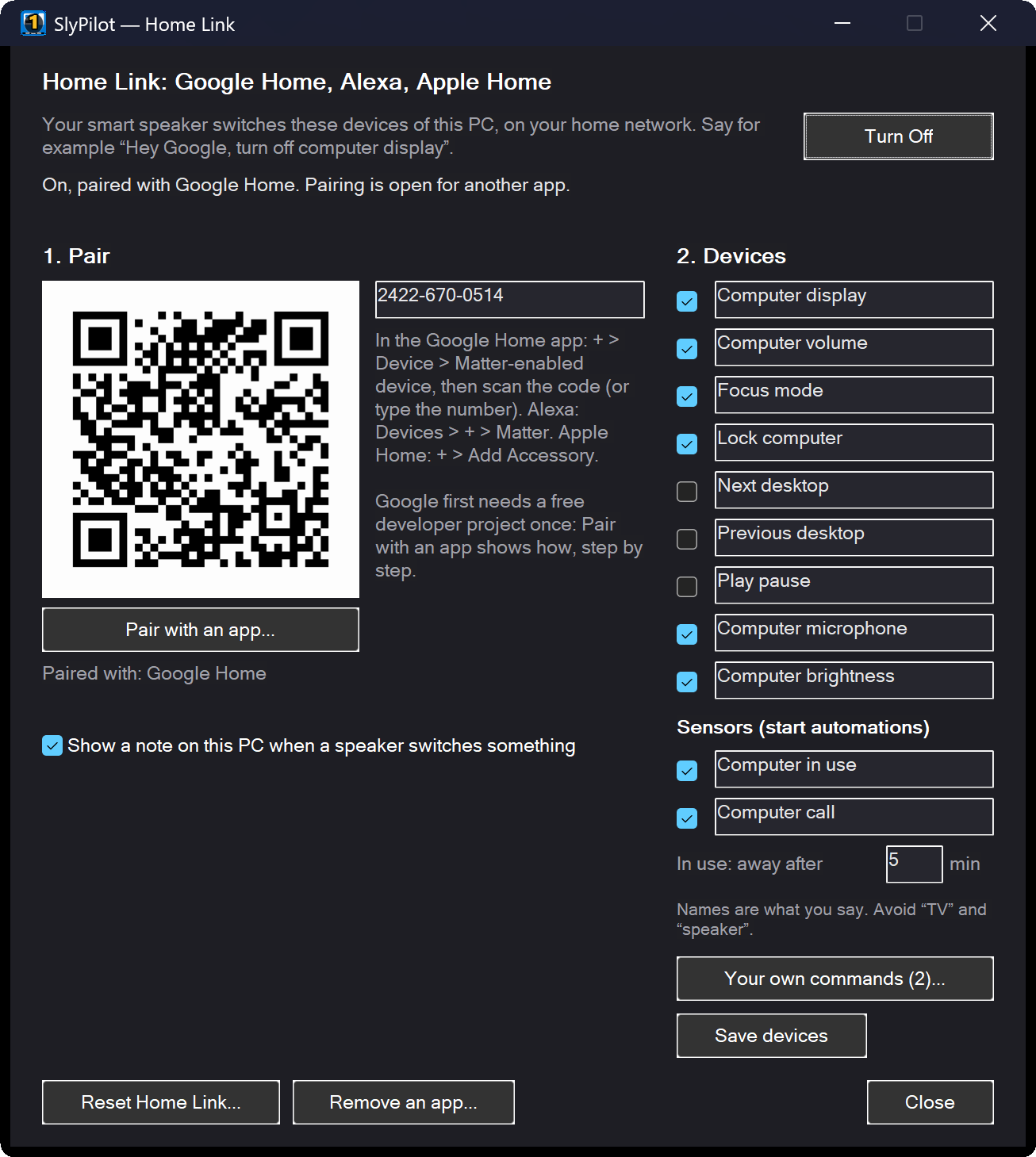
- On the PC: tray menu → Utilities → Home Link (Google, Alexa, Apple) → Home Link Settings... (or say "home link"). Press Turn On; the first time SlyPilot explains what it does and asks. Windows asks once whether to allow the helper through its firewall: allow it on private networks.
- Pick your devices in the window and name them the way you want to say them. Save devices.
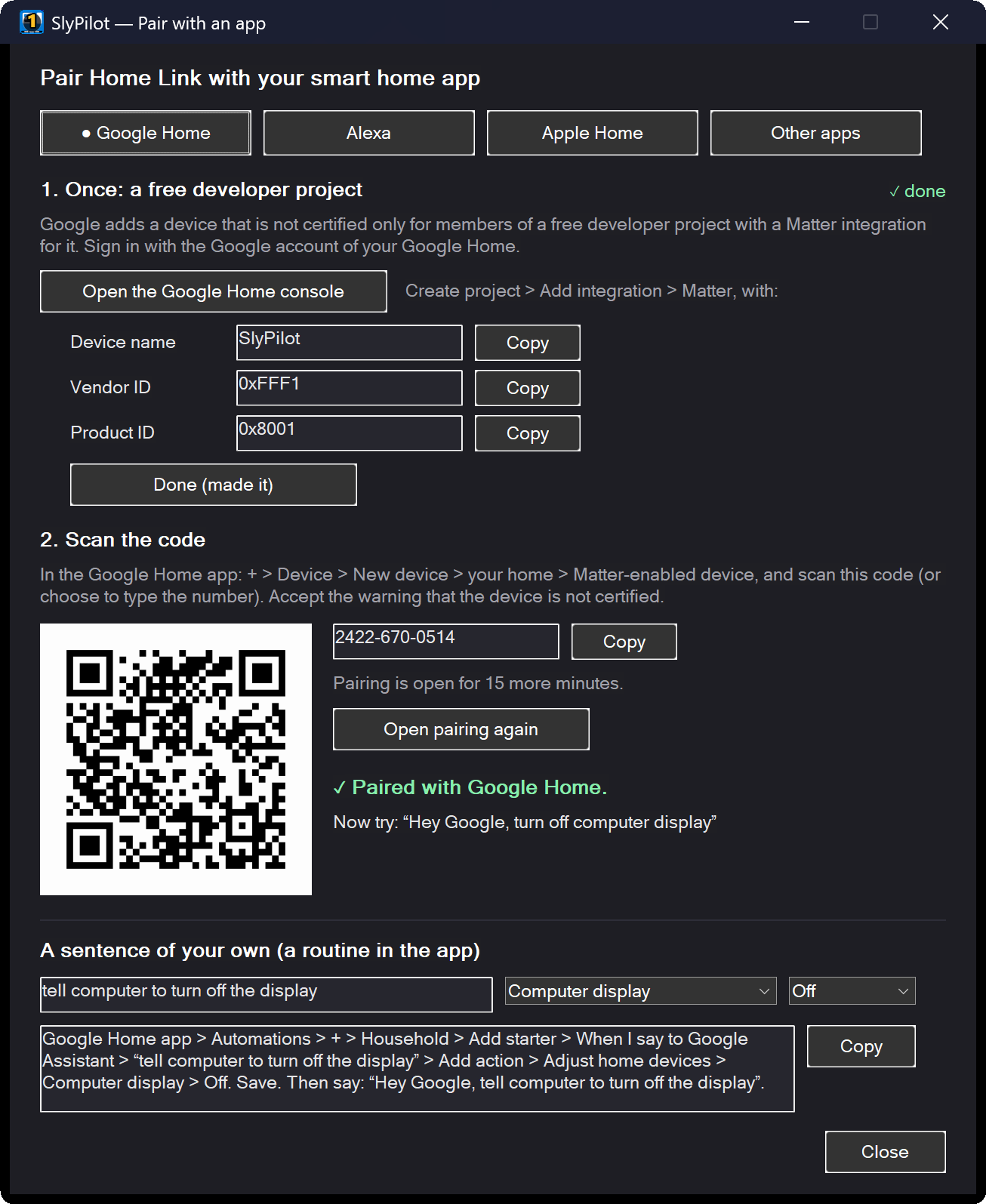
- Pair it with Pair with an app...: an assistant with a tab for Google Home, Alexa, Apple Home and other Matter apps shows each step, the QR code and the number, and says Paired with Google Home when it worked.
- Google Home first needs a free developer project in your Google account, once. The assistant opens the right Google page and has a Copy button for each value to enter: about five minutes.
- Alexa and Apple Home pair straight away (Apple asks you to confirm an uncertified accessory).
- Say it. "Hey Google, turn off computer display." The assistant also writes the routine steps for a sentence of your own, with your device names filled in.
Read the full Home Link guide →
🎛️ The Devices
| Device (default name, rename it as you like) | On | Off / level | While the PC is locked |
|---|---|---|---|
| Computer display | wakes the screen | screen off | works |
| Computer volume | unmutes | mutes; a percentage sets the volume | works |
| Focus mode | keeps only the active window | brings the others back | shows offline |
| Lock computer | locks the PC | (turns itself off again) | works |
| Next desktop, Previous desktop | switches desktop | (turns itself off again) | shows offline |
| Play pause | plays or pauses music and video | (turns itself off again) | works |
| Computer microphone | unmutes every microphone | mutes them | muting works, unmuting does not |
| Computer brightness | brings the brightness back | dims to the lowest level; a percentage sets it | works |
| Computer in use, Computer call (sensors) | (they report, they take no commands) | keep reporting ("not in use" while locked) | |
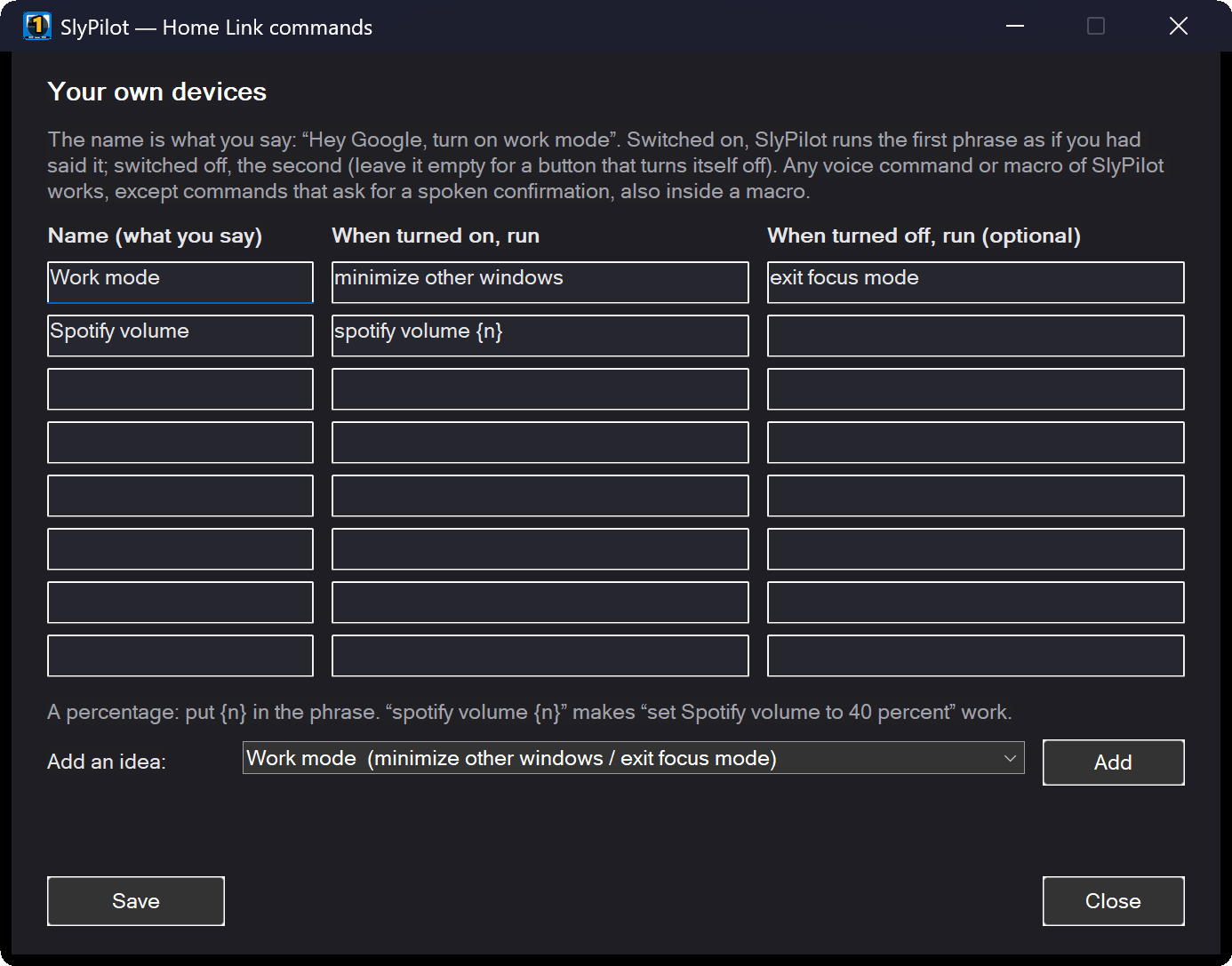
| Up to 8 of your own | runs your phrase | runs your second phrase, if you gave one | shows offline |
Your own devices run anything SlyPilot can do by voice: a built-in command ("minimize other windows", "go to desktop 3", "pomodoro timer"), a macro of yours, a snippet. You give each one a name you say and the phrase it runs when it is switched on, and optionally a phrase for off. Ready-made ideas (Work mode, Pomodoro, Read it to me...) fill a row with one click, and a phrase with {n} takes a percentage: spotify volume {n} makes "set Spotify volume to 40 percent" work. SlyPilot checks every phrase when you save, including each step of a macro, and refuses anything that would ask for a spoken confirmation.
If you like, SlyPilot shows a small note on the PC whenever a speaker switches something.
🔒 Safe by Design
A speaker in the room means anyone in the room can say a command. Home Link is built for that:
- Off until you switch it on, and a new app can only pair with the code shown on your own screen, during a 15-minute pairing window that you open.
- Only what you allow. The apps see only the devices you ticked. Each device does one fixed thing, or runs the phrase you gave it.
- Nothing risky, ever. Commands that normally ask you to say "confirm" (closing all windows, deleting a desktop, shutting down...) are refused from a speaker, also when they are a step inside a macro. "Confirm" itself can never be a device's phrase.
- The lock screen stays locked. While the PC is locked, only the display, the volume, the brightness, media and Lock computer work, and the microphone can be muted but not switched on; the other devices show as offline in the app. Nothing can unlock the PC.
- Sensors only with their own yes. They are off until you tick them, and SlyPilot asks separately before the first one goes on.
- Encrypted and authenticated. Matter encrypts every message and checks every app with its own certificates, made when it paired.
- You see who is paired. The window lists every paired app (Google Home, Alexa, Apple Home...), and the Doctor checks the network, IPv6 and the firewall for you.
🕵️ Private by Default
- No sound, no speech, no text reaches the PC. Only "device X on / off / level N". What you say is handled by your speaker and its company, exactly as for a smart plug; they see the device names you chose.
- Sensors share only "occupied" or "not occupied", and only after you agreed: with them on, the smart home company learns when the PC is in use or on a call, as with any sensor in your home.
- Nothing goes to us. Home Link sends nothing to slypilot.com and needs no account.
- The log records which device was switched and which app is paired, never anything that was said.
✅ What You Need
- SlyPilot Pro on a Windows 10 or 11 PC that is on your home network (Wi-Fi or cable).
- A Matter hub from your app's maker: for example a Nest Hub or a Nest speaker for Google Home, a recent Echo for Alexa, a HomePod or Apple TV for Apple Home. Check the maker's list of Matter hubs.
- IPv6 switched on on your home network (most routers do; Google requires it for Matter). The Doctor tells you if the PC does not have it.
- The PC on, with SlyPilot running. A speaker cannot wake a PC that is asleep or off; when the PC wakes up, Home Link is back by itself a few seconds later.
About certification. Matter devices sold in shops are certified by the Connectivity Standards Alliance. Home Link is not (yet). That is why Google asks for a one-time developer project and why Apple Home shows an "uncertified accessory" warning before Add Anyway. Everything else works the same.